Task Management Software


New Articles New Articles RSS feed subscribe
 
Setting Dependencies between Sub-projects
Sub-projects are smaller, interrelated projects that compose larger projects. If sub-projects belong to one and the same project or programme, they are dependent upon each other in some way. Setting Dependencies between Sub-projects


New Checklists News RSS feed subscribe
 
Product Profitability Analysis Action Plan

Product Profitability Analysis Action Plan is created to help company managers in their efforts to keep their products at the best revenue level.

Product Profitability Analysis Action Plan


Home » Solutions » Articles » Build proper business task system that will help you to manage your enterprise
Build proper business task system that will help you to manage your enterprise  

Build proper business task system that will help you to manage your enterprise


Business task system is an overall complex of rules, instruments and approaches that are documented and applicable for entire company. Business task system is collaboration environment that ensures two-way communications between employees and company management. These cannels of business task system are used for effective internal coordination and cooperation. Well-adjusted enterprise tasks system (also called task management system) is a mechanism that allows to optimize company workflow and to realize potential bounded by ineffective management. Business tasks system includes methods of task planning, tracking, reporting, sharing and collaboration. In other words task management system of enterprise consists of several sub-systems: planning tasks system, task tracking system and reporting tasks system. These systems can be easily driven by computer-based task management system. Let's consider how each of systems works and how software can be applied:

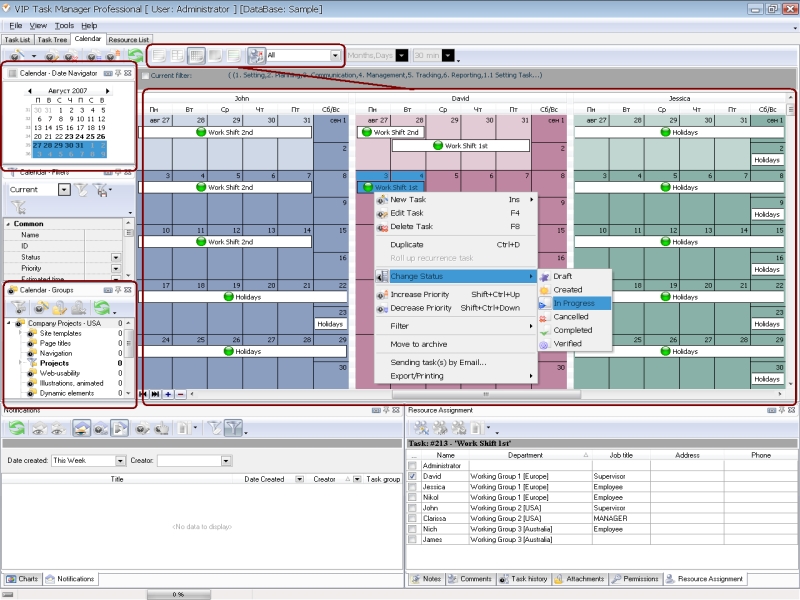
  • Planning work (tasks, jobs, objectives, projects) system task is to handle activities and tools that are required for registering assignments, building team schedules, balancing workloads, setting priorities and timelines. Planning tasks system can be easily facilitated by special software. It is advisable to use client-server planning tasks system, so your employees can be immediately notified about assigned tasks.VIP Task Manager is task management system that allows creating tasks, setting timelines and priorities, assigning tasks to performance.
Build proper business task system that will help you to manage your enterprise
  • Tracking work system task is to monitor project or business progress in terms of tasks completion, time, quantity, quality and costs. Task tracking system is very important because it allows project and enterprise managers to check if everything is going according to plan and if certain reorganization is required. Task tracking system also can be easily facilitated by special software that allows team managers first to assign jobs and then to control how well they are performed.VIP Task Manager is tasks management system that allows tracking performance, productivity and results in real-time regime.
  • Reporting work system task is to give to provide tasks performers with tools to report about their accomplishments. Reporting tasks system is essential part of task management system, because it allows collecting and studying reporting data. Usually reporting documents provided by employees are carefully stored in corporate archived files. Such file system task is to provide company experts and analysts with information obtained in the process of project performance. Another reports file system task is to support decision-making.VIP Task Manager is a task management system that can standardize and unify task reporting in your company.

Read also a new article about process management - project management client-server software for Windows


VIP Task Manager
Task management software
for teams & small offices
Play Demo / Download

CentriQS
Business management software
for small & midsize enterprises

Play Demo / Download


home contact site map my account


Copyright © 2004 - 2012 VIP Quality Software, Ltd. All Rights Reserved.