Task Management Software


New Articles New Articles RSS feed subscribe
 
Setting Dependencies between Sub-projects
Sub-projects are smaller, interrelated projects that compose larger projects. If sub-projects belong to one and the same project or programme, they are dependent upon each other in some way. Setting Dependencies between Sub-projects


New Checklists News RSS feed subscribe
 
Company Expenses Action Plan

Read this Company Expenses Action Plan to find out what kinds of expenses your small company is likely to generate.

Company Expenses Action Plan


Home » Solutions » Articles » Calendar schedule software: managing time better
Calendar schedule software: managing time better  

Calendar schedule software: managing time better


Why use calendar schedule software
There's no more important thing to your productivity arsenal than solid calendar schedule software. Considering the fact that we spend so much time at the computer, a good calendar schedule program is the necessary thing to bring order to our electronic agenda and to-do list. When we start planning and doing our tasks, it usually seems that they are overwhelming and hard to perform. We often ask ourselves, "What needs to be done at first, and when?" The answer can be found if using calendar schedule software. A powerful calendar schedule application for storing and displaying tasks and events lets you get your schedules in daily, weekly or monthly view. A day calendar schedule, week calendar schedule, month calendar schedule and year calendar schedule are the great options of calendar schedule software that all together bring flexibility for planning your tasks and agendas. Calendar schedule application helps you share your plans with friends and family or colleagues and employees.

Making scheduling process easier
The process of scheduling of project tasks isn't a terribly complicated thing since you can apply calendar schedule program. The scheduling process usually requires a few hours to prepare an adequate day calendar schedule, weekly calendar schedule, month calendar schedule or year calendar schedule for use by the project team. The steps you should follow and the order in which they are accomplished using calendar schedule software are as follows:

Calendar schedule software: managing time better
  • Create a list of activities (tasks) to be included
  • Determine the sequence (priorities) in which they will be performed
  • Determine preceding and succeeding tasks for each task
  • Set activity durations (task duration)
  • Enter all this information into a project folder in calendar schedule application
  • Share and distribute the new schedule to the project team

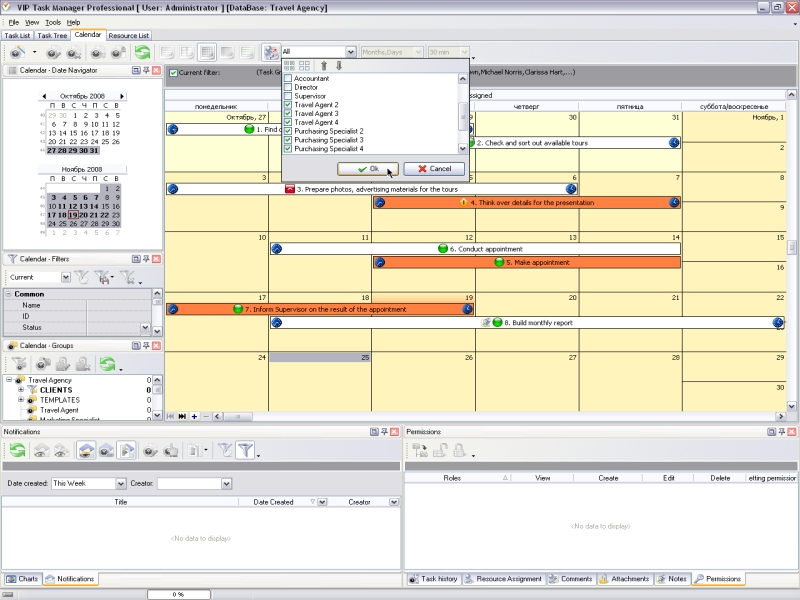
The procedure of the scheduling can be accomplished by using VIP Task Manager. This calendar schedule program allows creating day calendar schedule, weekly calendar schedule, month calendar scheduleand year calendar schedule. VIP Task Manageris designed to make the optimal assignments through the effective scheduling process, including prioritizing, setting due dates, and sharing information. The advanced calendar schedule software provides real-time collaborative scheduling tools, including shared database, multi-view calendar, task patterns and templates, references and links to documentation (project plan, specifications), charts and reports, e-mail reminders and notifications, etc.

Read also a new article about process management - project management client-server software for Windows


VIP Task Manager
Task management software
for teams & small offices
Play Demo / Download

CentriQS
Business management software
for small & midsize enterprises

Play Demo / Download


home contact site map my account


Copyright © 2004 - 2012 VIP Quality Software, Ltd. All Rights Reserved.