


 home
home contact
 site map
 my account


|
| |||
 |
|
 |
VIP Task Manager |


|
| |||
|
|
|
VIP Task Manager |
|
If you are looking for something that can help you to manage joint agenda of multiple team members who collaborate at common project, there is nothing better than a shared calendar view which is accessible for everyone in your team. Shared schedule is really effective way to announce and track activities, tasks and events on the project flow as calendar view is a clear visual representation of time. The best modern way to keep your project timetable shared and accessible is to use computer-based calendar viewer for multiple users. Such a timetable can be used to share general project resources and more specified views with detailed elaboration such as day , week or month calendar . Another important kind is a timeline that shows chronology of project events. In other words your resource calendar view should be supported by a tool with schedule "zoom in/out" capability, so you can switch from day calendar to week/month agendar or when you need to display your routine tasks on a scale of your agenda. | ||
|
Many businessmen, lawyers, doctors and other persons with intensive agenda have come to necessity to use resource calendar view software in their day-to-day practice, because with a help of proper calendar view tool you will not miss any of your upcoming business and friendly meetings, conferences, calls, commitments, birthdays and other events. Proper example of such client-server calendar software is VIP Task Manager that provides adjustable Calendar mode which can be simultaneously used by multiple teammates to schedule and share their agenda in different time regimes - from daily to yearly view . |
||
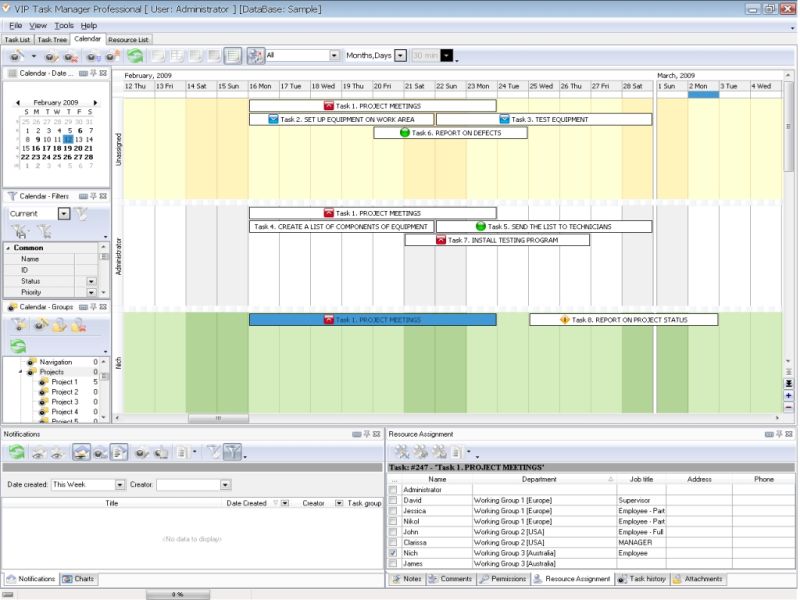 |
Calendar of VIP Task Manager is an elegant and versatile view which makes it easy to plan and maintain timetable of your team tasks, events and appointments in five possible views: daily view to see daily chores and appointments of every team member, week and month calendar view to see weekly or monthly tasks, year agenda to overview long-term tasks, and time grid regime (timeline) to see chronology of tasks. Besides calendar view with all its regimes, VIP Task Manager provides Task List and Task Tree modes. |
|
VIP Task Manager is a universal calendar viewer that works equally well both through Internet and local network. Owing to paperless technology provided by this calendar viewer and facilities provided by your local network you can tremendously increase speed of interactions between your team members, and you also can print out team day calendar view, week calendar view, month calendar view and year calendar view when this is necessary. You can download free trial version of this resource calendar view tool from this web-site right now. Read also a new article about process management - project management client-server software for Windows |
||

 Play Demo
 Play Demo
|
| |||
|
|
|
VIP Task Manager |

 home
home contact
 site map
 my account