


 home
home contact
 site map
 my account


|
| |||
 |
|
 |
VIP Task Manager |


|
How to manage workload in 3 minutes |

|
|
| |||
|
|
|
VIP Task Manager |
|
The success of a company can be measured by the efficiency of processes and workflow it has. The company always looks for the ways to minimize time spending and improve productivity. Task and processes are changed during the workday. The workflow may be changed dynamically, and the company management needs to make quick decisions to manage changes adequately. The point is to assess workload of each employee and always keep on track their performance. Workload management helps to view task performance and control the employee's working hours. It is aimed to create uninterrupted working process and make rational assignments to avoid work overload and employee procrastinations. |
||
Whether the company wants to maintain the working process just for current activity level or looks for the ways to diversify the activities, it needs effective workload management system. No matter what operational issues the company faces, the workload management decisions lets assess employee performance, reveal procrastinations and optimize the workflow by tracking and re-allocating tasks. The problem of task assignment and reassignment during the working process may become hard as the manager needs an effective workload management tool to assess task performance and track hours spent on the tasks. CentriQS is software that allows to manage task performance and efficiently allocate workload among the employees. CentriQS offers effective solution for creating and managing tasks and employee workload. The software allows to track task performance, assess workload, reveal overloaded employees and make quick reassignments to optimize the workflow. Workload management becomes more flexible as the software allows to manage tasks in real time from one remote or local manager's computer. The company benefits from use of CetriQS because of the following reasons: |
||
|
||
3. Task time characteristics. The manager often needs to know how many hours the employees spend on their tasks to track workload, optimize task allocation and avoid procrastination. CentriQS allows to keep work hours on track and to estimate the time spent by users on particular tasks. The manager can set the following time characteristic for a task: Due Date, Estimate, Actual, Remain, Deviation. If needed, he can use custom fields to add new task time characteristics like Task Time Duration. |
||

 Play Demo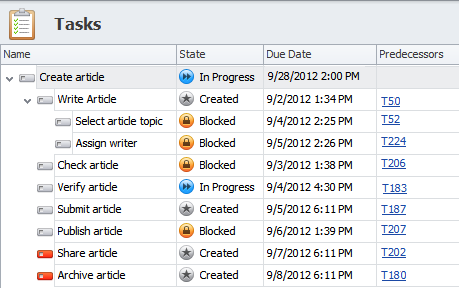
 Play Demo
|
| |||
|
|
|
VIP Task Manager |

 home
home contact
 site map
 my account