


 home
home contact
 site map
 my account


|
| |||
 |
|
 |
VIP Task Manager |


|
| |||
|
|
|
VIP Task Manager |
If you are a manager responsible for job planning , then you know that creating an agenda and scheduling employees can be a very time-consuming effort, therefore a lot of modern managers prefer using scheduling software that is represented by a cloud of special add-ons or templates to be downloaded and opened by MS Excel to specialize its initially wide functionality. Such scheduling spreadsheets exploit original capabilities of this tool to maintain different kinds of ready timesheets, working schedules, calendars, etc. These additional applications are developed and distributed by: | ||
|
  Play Demo Play Demo
|
|
 |
Scheduling software samples differ by range and specifics of their functionality: from very simple ones (just some plain tables where you can enter names of your employees and some other associated attributes) to highly professional and automated solutions that enable you to build up complex rosters allocating staff automatically and performing some cascading calculations including staff wages, working hours, different indexes, etc. It is a practice that gives you a variety of options to choose from, but there are workflow spheres where you may need instruments to run time management in a more efficient manner. |
|
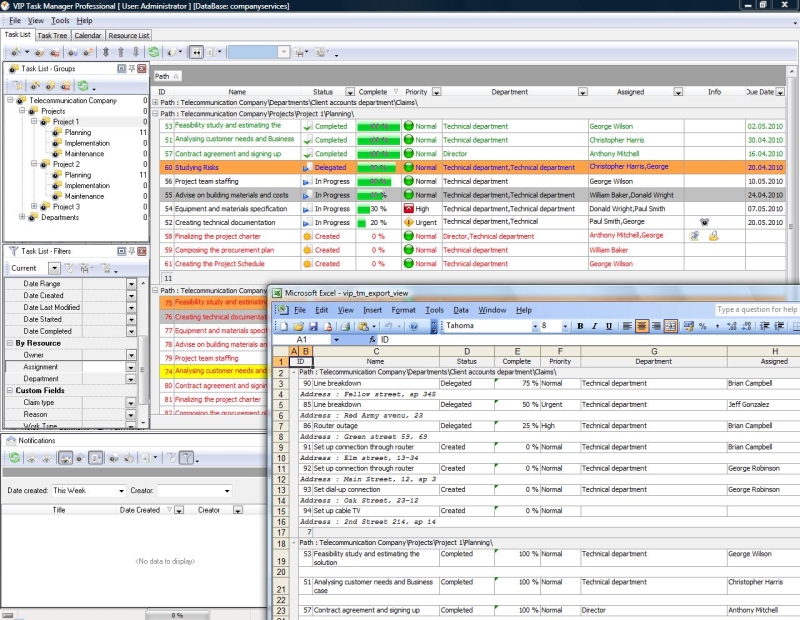
VIP Task Manager is not an Excel-based application and it doesn’t support any templates, but it provides scheduling functionality that would be useful on the projects where people need real-time data sharing and updating. It features Task List mode that works like a spreadsheet to construct employees’ timetables, worksheets, timesheets and plain to-do lists. All the information is recorded in a special database, and therefore it can be simultaneously shared and reported by multiple co-workers. |
||
 Play Demo
|
| |||
|
|
|
VIP Task Manager |

 home
home contact
 site map
 my account