


 home
home contact
 site map
 my account


|
| |||
 |
|
 |
VIP Task Manager |


|
| |||
|
|
|
VIP Task Manager |
|
What is a value calculator? Two sides | ||
The "get" side is about determining the company's advantages as an employer. When employing new employees and managing existing employees, the company should be the most attractive among competitors on the market. The more the company is attractable for new and existing employees (better rates, increased salary, better conditions of work, convenient location of offices, etc.), the more it can get from them. Employee value calculation program allows to create constantly improving conditions of work where employees are essential for the employer, so they are ready to work and make new achievement. By using employee value calculation tool, the company's managers can assess and measure the input of each employee as well as the total input of a group to the success. |
||
 |
This side is referred to compensating employees for given efforts and the input from various groups and teams of the company. The side turns around gathering information on the work done, working hours spent, rates stated and employees involved in the work. Employee |
|
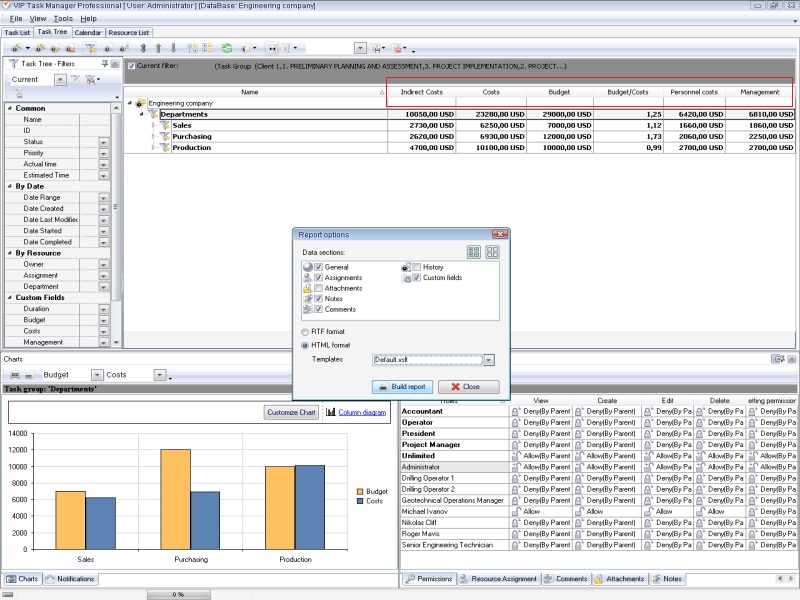
To realize how the two sides work in practice, you try VIP Task Manager, a good employee calculation example. The software is server-based application that supports local connection or Internet to give access to corporate databases. By using VIP Task Manager, you can create a new database which will contain tasks, appointments, schedules, and all other information required for running your company's workflow. The Custom Fields functionality of the example will let you create and apply specific task parameters and formulas. You can apply such task custom fields like 'Hours Worked, 'Extra Time', 'Labor Rate', 'Salary', 'Bonus', 'Penalty', and others to determine the "get" side and figure out the "give" side. Read also a new article about process management - project management client-server software for Windows |
||

 Play Demo
 Play Demo
|
| |||
|
|
|
VIP Task Manager |

 home
home contact
 site map
 my account