


 home
home contact
 site map
 my account


|
| |||
 |
|
 |
VIP Task Manager |


|
| |||
|
|
|
VIP Task Manager |
|
The key to successful project management is to deliver the right information to the right team members at the right time. The question of right permissions and authorized access to project data is thoroughly resolved with help of file permissions software for projects. Such a solution can offer tremendous opportunities for the way you handle the project workflow, task assignments, and project progress. By using the features of that kind of software, you can check permissions , track task statuses and share project data among team members. It provides complete visibility into what project data a user can review or change, who is responsible for current work and how to change user permissions (allow or deny ) in a few clicks. That software for projects allows to set access rights for different teams and groups and to manage different levels of access to project files. A team member will get access to project data depending on his/her role, position and responsibilities within the project. File permissions software lets prevent other team members from having access to denied files. File permissions software for projects offers the following capabilities for better project management: | ||
To get these capabilities realized in your projects, you can use VIP Task Manager. |
||
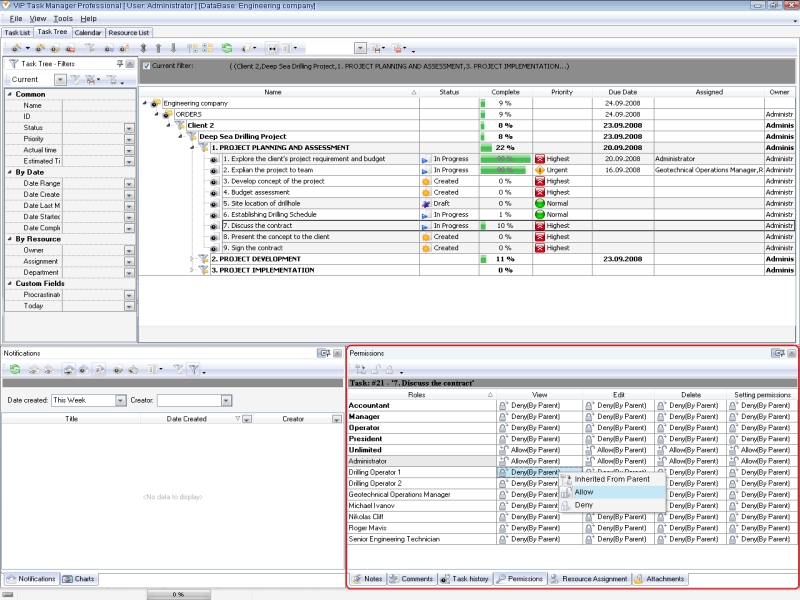 |
In VIP Task Manager there are several different permission types (View, Create, Edit, and Delete) that team members can obtain. Each type can be allowed or denied. To change file permissions (allow or deny file permissions ), you need to set user permissions for task groups (folders) in the project tree. It can be done in Permissions Panel. This panel displays names of project resources (team members) and created roles, so you can change file permissions (allow or deny file permissions ) per team member and per role. |
|
Every user may have individual permissions to each project folder. The software supports inherited permissions from parent folder to all subfolders inside, so you can set file permissions for the parent folder and all internal folders will get file permissions automatically. VIP Task Manager notifies users of any error . When a user is trying to edit a task or an associated file, the software shows a file permission error and the user doesn't get file permissions . Read also a new article about process management - project management client-server software for Windows |
||

 Play Demo
 Play Demo
|
| |||
|
|
|
VIP Task Manager |

 home
home contact
 site map
 my account