


 home
home contact
 site map
 my account


|
| |||
 |
|
 |
VIP Task Manager |


|
| |||
|
|
|
VIP Task Manager |
|
File sharing software is a system that allows sharing files among team members. Actually such software uses standard local possibilities, but gives them more convenient appearance and user-friendly interface. Generally It is a type of tools that are helpful when project team needs to share files that contain various project documents. Usually, during project or business workflow users need to share files - documents are prepared with a help of different office applications and transferred step-by-step between team members that should perform their part of work. Often data exchnage happens in not perfect way, for example via e-mail or using standard capabilities of LAN - documents can be placed in shared folders within LAN, so users have to share files according to verbal agreements or some schedule. This is the first purpose of file sharing software - to facilitate process of team collaboration through improved procedure of networking . Business processes that include document circulation are hard for tracking and measurement. The next purpose is to make such business processes measurable and easy for tracking. Project coordinators should be able to track status of each document and process. | ||
|
Let's consider how to share files via special software and what features file sharing software should have. As far as network tool should be able to manage document-related business processes (process can be considered as a sequence of tasks) this software should support task and time management features. In other words that software should allow creating and assigning tasks. In order to share files users need to attach documents to tasks, so they exchnage attachments that belong to appropriate tasks with certain status. |
||
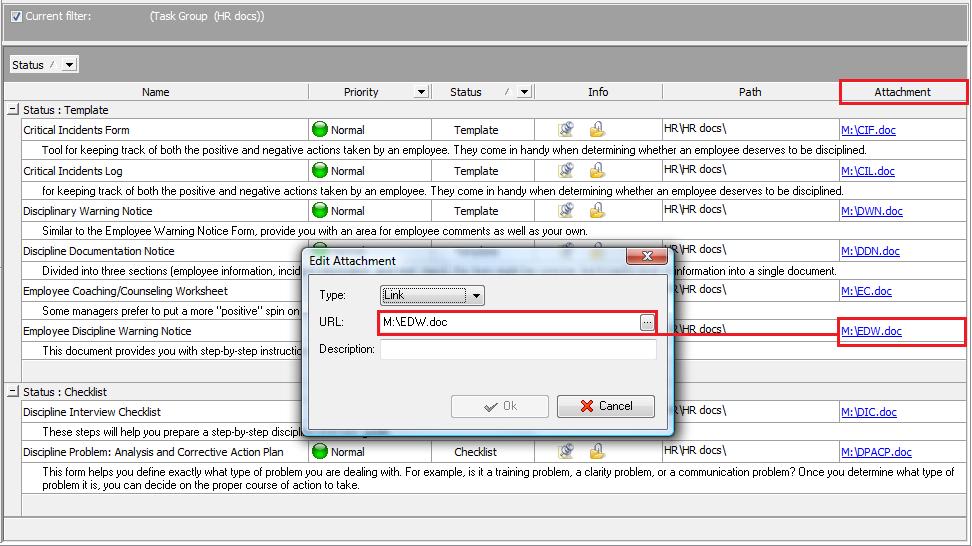 |
Accordingly team document circulation is a process of exchange attachment data. Progress of exchange attachment collaboration can be reflected on special task list that displays task statuses and helps to share attachment hyperlinks . Sharing files with a help of convenient schedule, establish exchange attachment process within working team - this is only small part of benefits which good task management and network solution can provide. The workflow of organizations that need to handle big volumes of paper work and documents circulation can be greatly enhanced by proper software . |
|
VIP Task Manager is a groupware that makes business processes easy for planning, tracking and reporting. This client- server task management and file sharing software allows team members to view and share work documents, share work performance information and collaborate with each other in real-time regime Read also a new article about process management - project management client-server software for Windows |
||

 Play Demo
 Play Demo
|
| |||
|
|
|
VIP Task Manager |

 home
home contact
 site map
 my account