


 home
home contact
 site map
 my account


|
| |||
 |
|
 |
VIP Task Manager |


|
| |||
|
|
|
VIP Task Manager |
|
No matter what the industry and field of your business are, both professional staff management and relationships between staff members mean more successful business. In context of business software solutions, network tools for business can provide the biggest boost to business. Such products help organize highly qualified personnel and establish new employee relationships which are based on efficient task management. By applying those software packages companies can effectively build the workflow that would support streamlined information exchange and task management. Business network tools allow measuring business success in profits. It means that they create synergy and make it easy for staff members to collaborate, communicate and exchange business data with each other. There're three essential opportunities that business network tool delivers to a company:
| ||
|
The question which tools (online or local) ) to use depends on your requirements. Online packages will be better for those companies that have diversified offices and divisions across the world. They allow accessing the remote database through internet browsers. Local solutions are suitable for small companies that have one or several offices, and employees can access the office database through LAN. As to operating system that supports one or another network tool , your choice will be probably in favor of Windows-native software packages . In most offices today windows network tools are the most popular choice. Your staff will quickly learn how to use such solutions . |
||
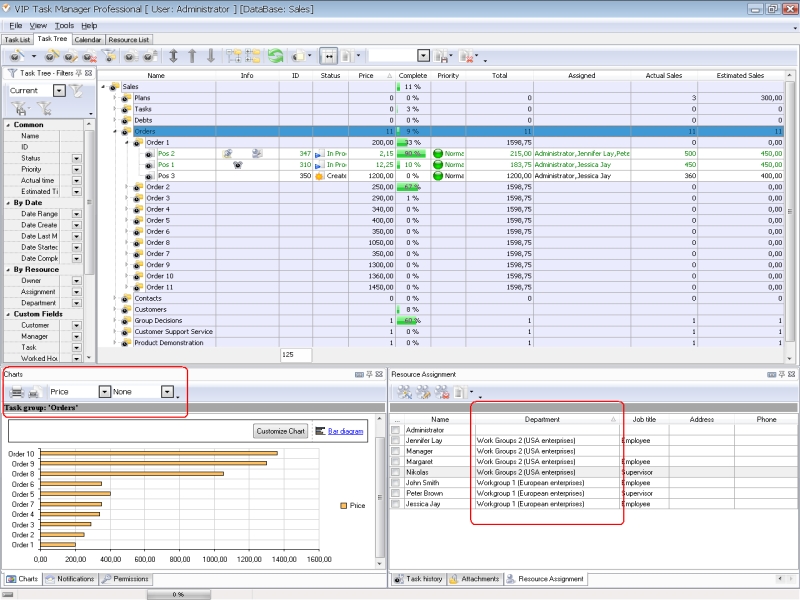 |
VIP Task Manager is a client-server solution for task management, team organization and business management. The software provides remote and local network tools for creating a centralized database which stores all corporate information. VIP Task Manager supports real-time data exchange and team communication. |
|
You can download a full package of VIP Task Manager from this website. When you decide to download it , you can choose two editions VIP Task Manager, including Professional and Standard. For the first 30 days of the use of the tools you can try VIP Task Manager for free. Read also a new article about process management - project management client-server software for Windows |
||

 Play Demo
 Play Demo
|
| |||
|
|
|
VIP Task Manager |

 home
home contact
 site map
 my account