


 home
home contact
 site map
 my account


|
| |||
 |
|
 |
VIP Task Manager |


|
| |||
|
|
|
VIP Task Manager |
|
In project management timely receiving and delivering of information is vital. The ability to support notification service lets notify team members of important task updates and upcoming events beforehand. Like Windows alert service which shows pop-up messages about new Windows updates, there're task notification services in project management software solutions that inform about new task updates in projects. When we use Windows service , we can apply new updates, so our operating system will have the latest revision that has the best system performance for today. The same is with that service . The project manager can receive notifications to review current status of the project and take measures to make the project more efficient. Then the project performance becomes the best. Here's the list of benefits that those services can deliver to your project: | ||
|
||
 |
The listed benefits show that notification services are vital for efficient project management. If you start searching for a project management solution, you may find web-based and client server tools . Both solutions can suite your needs. Web solutions will be best for large companies that have distributed offices and hundreds of employees. Large companies use internet browsers to work at those solutions. If you own/manage a small company, most likely the client server packages will be the best solutions for you. An example of client server notification services solution is VIP Task Manager Pro . |
|
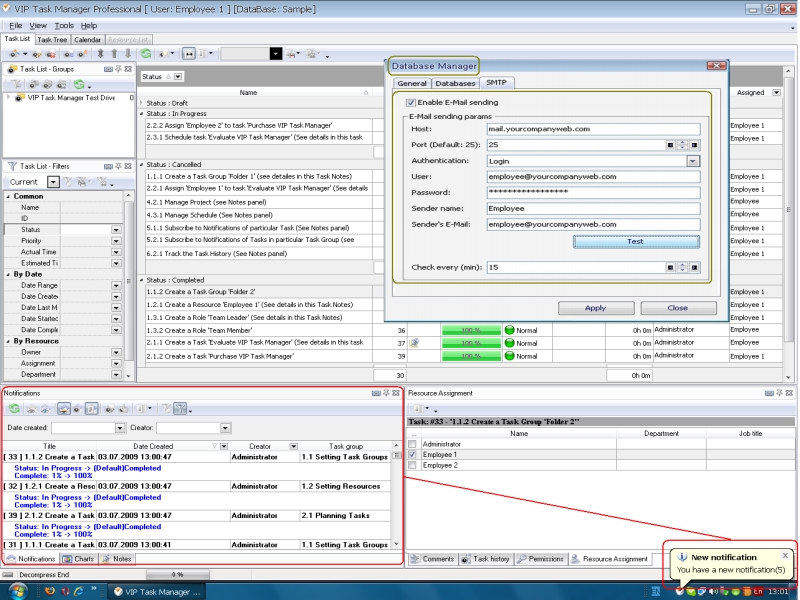
VIP Task Manager provides tools for effective collaboration and team management. It's a client-server program in which you can change notification service settings. There's Notifications Panel in VIP Task Manager that displays new events if task have been changed. Database Manager will let you configure SMTP settings for receiving email alerts . Read also a new article about process management - project management client-server software for Windows |
||

 Play Demo
 Play Demo
|
| |||
|
|
|
VIP Task Manager |

 home
home contact
 site map
 my account