


 home
home contact
 site map
 my account


|
| |||
 |
|
 |
VIP Task Manager |


|
| |||
|
|
|
VIP Task Manager |
|
When the manager determines the scope of a project, the following stages should be completed:
|
  Play Demo Play Demo
|
|
This typical process of defining the project scope can be implemented in VIP Task Manager software. This project management application has a set of tool for efficient project planning, launching, developing and completing. On initial stage of project planning, the listed phases of project scope can be easily developed and implemented into the project. In Resource List view of VIP Task Manager you can add participants of the project and assign role and permissions to each of them. Each role means individual or group settings applied to a task or task group. When defining project scope, roles will help you register users in VIP Task Manager and set their responsibilities for the project. |
||
|
|
Calendar view enables you to draw up schedule and share it with all project stakeholders. The convenient, user-friendly interface and drop-and-drag function will allow to create and edit schedules in several mouse clicks. Schedules can be sent by email to any resource listed in Resource List view. |
|
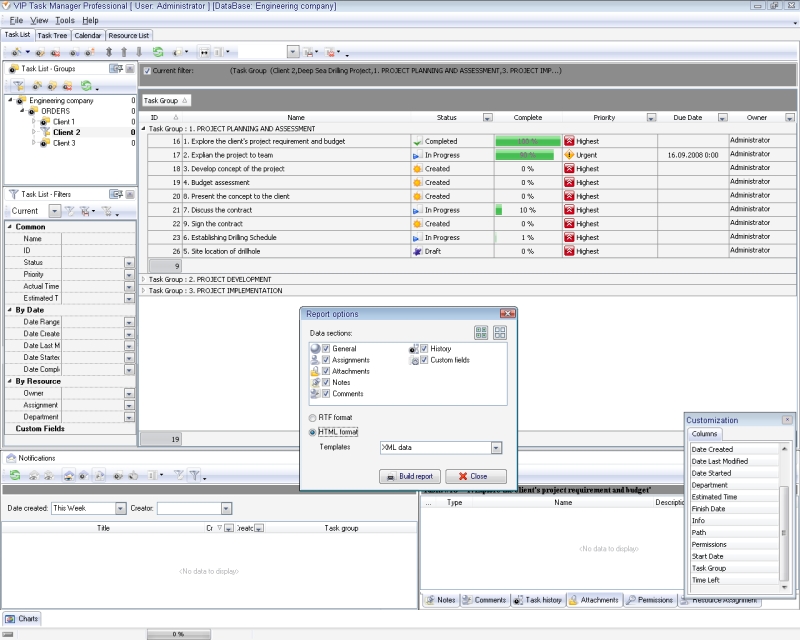
The system of task report brings a set of tool to customize the report structure your project team requires. When building a report, you can choose which task options are to be included into the report. For example, for quick and specific reports, you choose such task options like general information (task name, time and dates, priorities) and assignment. So you will get the report with short but sufficient information. Besides mentioned options, the full report includes the following task attributes: attachment, notes, custom fields, comments and task history. Read also a new article about process management - software systems for automating project processes |
 Play Demo Play Demo
|
|
|
| |||
|
|
|
VIP Task Manager |

 home
home contact
 site map
 my account