


 home
home contact
 site map
 my account


|
| |||
 |
|
 |
VIP Task Manager |


|
| |||
|
|
|
VIP Task Manager |
Project management scheduling software is the core of project plan implementation. It is used by project managers to commit teams to project work and show stakeholders how the work will be performed. Tools of project management scheduling software are used to plan initial project timelines and communicate final deadlines as well as to determine resource needs. Project management scheduling tools are also used to design checklists to make sure that every task is performed. You can use such tools to put tasks on schedules and commit your project team to doing them. Checklists will help the team to perform project tasks following project schedules and timelines. No matter whether you choose commercial or free project management scheduling software, you will be able to do the following:
| ||
Project management scheduling tools will allow your team to collaborate and exchange knowledge while communicating in a single working environment. You can keep project data in one database file – then members of your project team will access this database to follow checklists, do tasks, share project management scheduling examples, review schedules, create reports, and so on. |
  Play Demo Play Demo
|
|
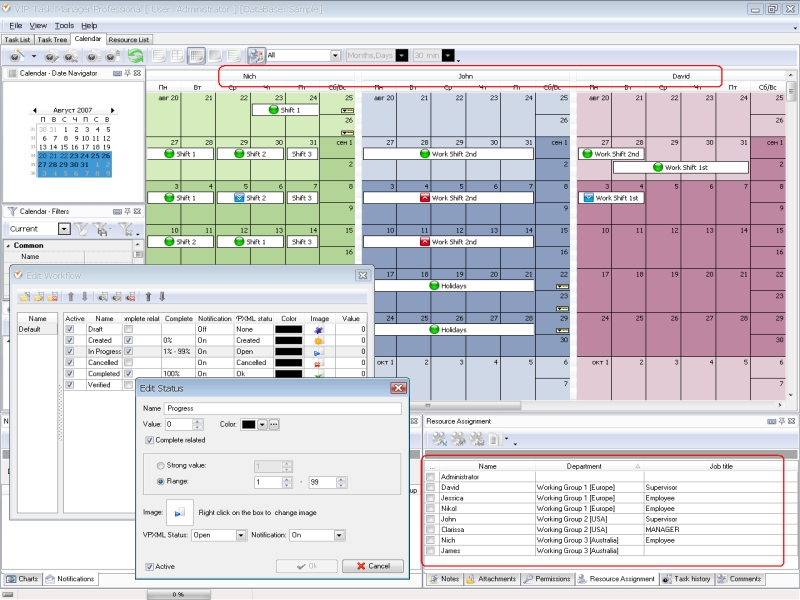 |
You can try project management scheduling tools through using VIP Task Manager. Here are several tools for scheduling in VIP Task Manager:
|
|
VIP Task Manager also features other tools that can help you schedule and manage your projects. To try all the tools and features of the software, you can download an evaluation copy. To get your copy of project management scheduling professional edition you will need to submit a short registration form available on this website.
|
||
 Play Demo
|
| |||
|
|
|
VIP Task Manager |

 home
home contact
 site map
 my account