


 home
home contact
 site map
 my account


|
| |||
 |
|
 |
VIP Task Manager |


|
| |||
|
|
|
VIP Task Manager |
|
The project manager is the person who has the overall responsibility for the successful planning and execution of the project. Usually project manager works with employees engaged in the project because people is one of the most important factors for achievement of better results by each participant of the project group. At the same time he shouldn't make a direct influence on efforts of each of employees because there must be enough space for creative work and self-expression of the employee. Discussions, negotiations and orientation to team coordination should be the basic lines of work of the project manager. In the whole, the role of the project manager lies in rendering of support to the employees working over the project. To be more particular, the role of the project manager embraces many activities including:
The project manager should rely only on results instead of on heroic efforts or sincere intentions. Therefore throughout the whole lifecycle of the project the project manager should be focused upon definitive or intermediate results that approach the process to successful end. The project manager should possess a toolkit that allows at any moment and from any geographical point to bring the data on each stage of one or several projects, to receive as much as possible full and a trustworthy information about a course of their performance and to be in due time informed on arising issues. |
||
  Play Demo Play Demo
|
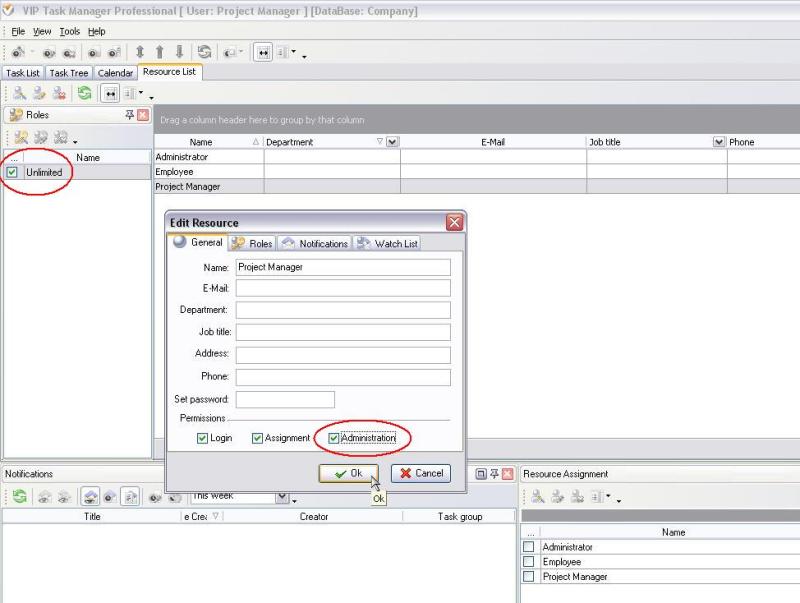
As a software solution, VIP Task Manager allows to plan amounts of jobs and supervise their results. It is impossible to imagine the project manager who is not keeping account money resources, therefore VIP Task Manager allows to form and supervise the project budget, to trace the project expenses. VIP Task Manager lets each user to have a personal access to the company database. When editing resources you can assign administration rights to a resource so that he will be able to manage (add, edit or delete) resource list. For those resources which do not have administration rights, Resource View is not active. |
|
VIP Task Manager allows assigning permissions and roles to resources related to the project. The role is a level of access to the tasks and task groups. There is a default role "Unlimited" in Resource View. The project manager can get this role and unlimited access to the tasks of the project. For example, the resource was created and assigned to unlimited role. Alternatively there is a possibility to create a new role "Project Manager" and set permissions to that role. In order to get full access to the project, in Permission panel the role "Project Manager" should have only "Allow" values (see the screenshot). |
 |
|
|
Besides granting full access to tasks of the project VIP Task Manager allows to assign supervisor to the tasks. The project manager can be a supervisor of the tasks and receive notifications on task changes by email. This feature is helpful for tracking the projects and separate tasks. Each notification shows the task's changes, so the supervisor can track the tasks status on Notification panel as well. |
 Play Demo Play Demo
|
|
|
| |||
|
|
|
VIP Task Manager |

 home
home contact
 site map
 my account