Project schedule tools are used to plan time-related matters required for successful project progress (project milestones, time parameters such as due dates, project metrics such as task durations, etc). There are different tools that are used for taking a complete overview of timeline in terms of different attributes and essentials such as tasks’ assignees, priorities, costs, etc. A whole set of tools can be incorporated into one multi-purpose program (such as VIP Task Manager) which can provide you with several kinds of electronic forms. Let’s briefly consider these tools and capabilities:
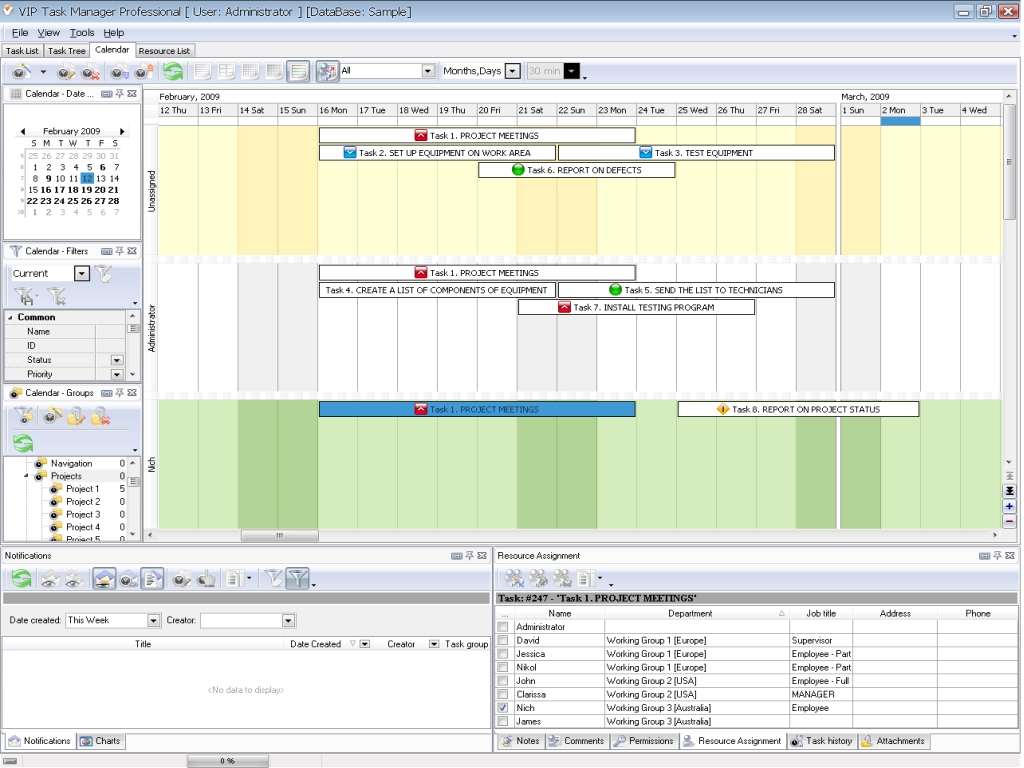
- calendar – this is a graphic representation of a schedule which is a convenient view for mapping out appointments and tasks on a time-grid. VIP Task Manager features such a Calendar that can work in several essential regimes such as Daily, Weekly, Monthly and Yearly views, and can show timeline of project events and tasks, so that you can always check what tasks and events will create your daily routine during some upcoming period of time.
|
- board – this is a table-like schedule of activities, which works as a timesheet or a columned todo-list where all the tasks are represented including their different attributes (priorities, assignments, statuses, etc). VIP Task Manager features such a table (Task List mode) where users can set out their tasks and appointments via setting data filtration (for example isolating tasks by their time period) and other interface-forming functions that will give you an appropriate layout of columns on this agile table.
|

 Play Demo Play Demo
|
 |
- tree-like chart – such a tree-like board can be used in management to get a high-level view of undertaken activities to pick up a picture of progress over the major phases and stages. VIP Task Manager provides users with a tree-like chart (Task Tree mode) which allows project and business managers to divide their projects, business processes and daily tasks into sections and sub-sections (categories).
|
- Real-time reports – these project schedule forms (Task List, Task Tree and Calendar modes) can interconnect planners of working tasks (superiors) and their performers (assigned subordinates) in real-time regime over your corporate LAN or the Internet, so that reports (on work performance and progressing) can be delivered from doers to superiors instantly. VIP Task Manager provides you with diagrams that can be used for comparing and analyzing project and matters (durations, costs, etc).
|
|
| |
|
|


 home
home contact
 site map
 my account




 Play Demo
 home
home contact
 site map
 my account