


 home
home contact
 site map
 my account


|
| |||
 |
|
 |
VIP Task Manager |


|
| |||
|
|
|
VIP Task Manager |
Proper shared calendar application is fantastically helpful tool for almost any company which would like to keep all its business processes on top of productivity. That's because using a scheduling tool is really effective and modern way to mobilize team members through announcing and tracking activities, tasks, milestones, team events and other happenings on the project flow. Shared calendar system that is accessible for everyone in your business or project workgroup, helps you to plan, support and coordinate their joint agenda, so many planning mistakes and confusions can be avoided in the bud. If your team members work with their computers with permanently running shared calendar service on them – teammates can stay in touch with latest schedule changes, upcoming arrangements, business conferences and other appointments that cannot be missed or ignored. | ||
|
Good example of calendar apps is VIP Task Manager that is a client-server task management tool for supporting schedules, timetables and working plans in any kind of organization. This software uses the server to coordinate schedules of multiple users in real-time. Functionality of this system allows corporate schedules to be simultaneously seen by multiple teammates to schedule and share their agenda in different time regimes – from day calendar view to year calendar view. Calendar mode is just a part of functionality of this powerful shared calendar tool, because this well-featured solution allows you to work in Task Tree view to create a break-down structure of your project, and Task List view to form task lists. |
||
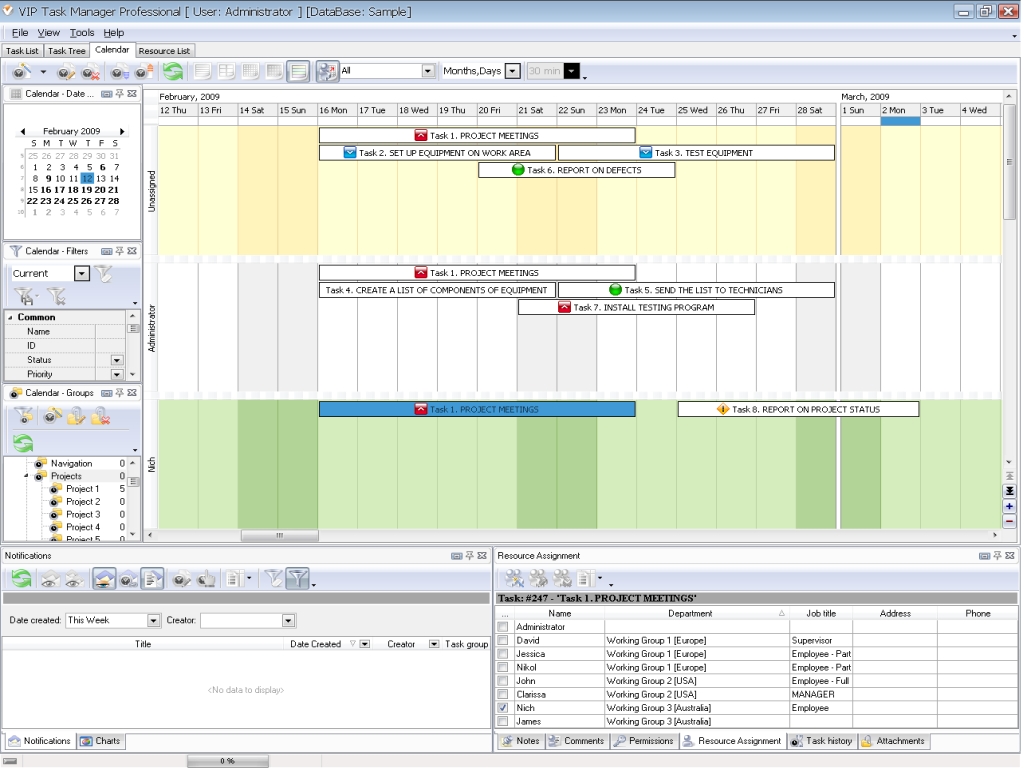 |
Calendar mode of VIP Task Manager, synchronized through shared calendar server, is an elegant and versatile view which makes it easy to plan and maintain timetable of your team tasks, events and appointments in five possible views: daily template to see daily chores and appointments of every team member, weekly and monthly templates to see weekly or monthly tasks, template to overview long-term tasks, and time grid regime (timeline) to see chronology of tasks. |
|
This app is one of the solutions which can be used in many day-to-day cases at the same time, examples: business resources scheduling, HR planning (career, vacancy, trainings planning), technical support and service (technical procedures planning), business process and project timelines designing, and much more. Read also a new article about process management - project management client-server software for Windows |
||

 Play Demo
 Play Demo
|
| |||
|
|
|
VIP Task Manager |

 home
home contact
 site map
 my account