


 home
home contact
 site map
 my account


|
| |||
 |
|
 |
VIP Task Manager |


|
| |||
|
|
|
VIP Task Manager |
|
Shared documents are indispensable part of collaboration at any serious project. They are used to support collaboration of workgroup members by providing necessary information regarding joint activities, project tasks and processes in context of common project. Project team members (users) delve into data storage for reading or updating content of these documents. Traditionally projects and organizations have to create repository (library) where all essential documents are organized and archived according to policy of management. Usually each of the files has a set of special attributes (owner, author, supervisor, ID, purpose etc) which facilitate document identification for better shared document editing, archiving, searching and management. | ||
|
Today, when owing to modern computer-based technologies it is possible to use paper-free digital documents that are easy to create, edit and share – shared document editing and storing is not a laborious process anymore, because shared files as well as shared document repository can be easily created and managed with a help of special software tools (that can be called shared document editors ). The most widespread software products for editing are tools included into MS Office – MS Excel and Word. Files created through these programs can be saved in files placed in a exchanged documents folder within LAN, so users from the same workgroup can access that storage and work with their files. |
||
 |
MS Excel has integrated collaboration capabilities (Excel file can be concurrently accessed and edited by several users) while MS Word doesn't have means to allow concurrent accessing of the one shared document Word file. One of the possible shared document editors for sharing alphanumeric information is the Google solution – it has means for concurrent reading and shared document editing, but these documents online are kept in format of inner file editor, and this text editor has only basic capabilities along with poor usability (in comparison with MS Word), so keeping serious shared documents in Google is not advisable so far. |
|
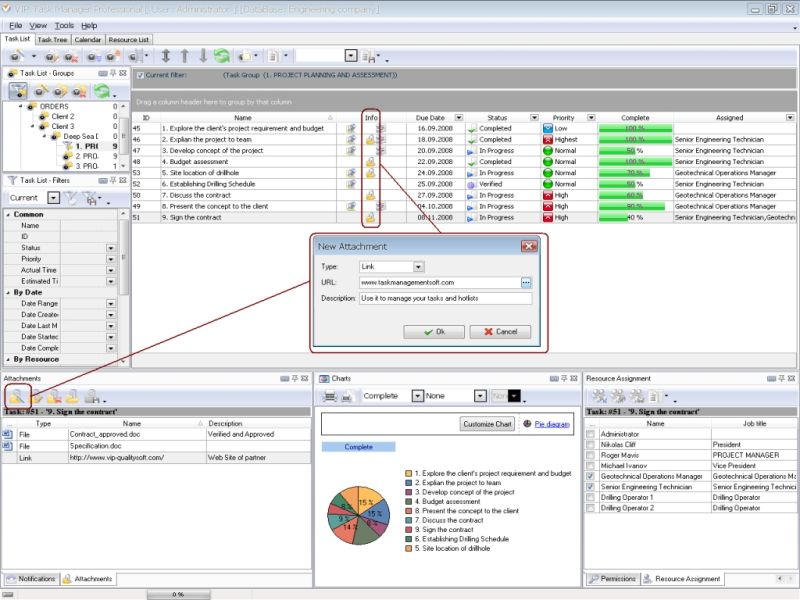
The best way is to keep shared files in appropriate special formats, like Word and Excel, but to arrange shared document repository with a help of software that works like MS Sharepoint. Software that combines functions of shared online library with project management software is called VIP Task Manager. With a help of this client-server tool you can establish shared network where each project team member can access common database to plan, study and report own tasks with files attached to them. This software has flexible system of access rights management, so you can set shared permissions for viewing and modifying content of tasks together with attached documents Read also a new article about process management - project management client-server software for Windows |
||

 Play Demo
 Play Demo
|
| |||
|
|
|
VIP Task Manager |

 home
home contact
 site map
 my account