Task Management Software


New Articles New Articles RSS feed subscribe
 
Setting Dependencies between Sub-projects
Sub-projects are smaller, interrelated projects that compose larger projects. If sub-projects belong to one and the same project or programme, they are dependent upon each other in some way. Setting Dependencies between Sub-projects


New Checklists News RSS feed subscribe
 
Company Expenses Action Plan

Read this Company Expenses Action Plan to find out what kinds of expenses your small company is likely to generate.

Company Expenses Action Plan


Home » Solutions » Articles » Staff schedule software: work better with the multi-user calendar and spreadsheet
Staff schedule software: work better with the multi-user calendar and spreadsheet  

Staff schedule software: work better with the multi-user calendar and spreadsheet


Basically, staff schedule software is a type of software helping to create timetables and timelines for employees. Earlier the term staff schedule software referred to programs used individually by staff managers, helping them to design proper allocation of working shifts and tasks in terms of business time. However, today staff schedule software means more powerful programs that can be used not only for composing schedules and working plans, but also for communicating them to performers (employees), and for tracking how well these plans are fulfilled. Example of such software is VIP Task Manager that provides adjustable staff schedule templates to represent main schedule formats. Let’s consider these usual staff schedule formats:

  • Staff schedule calendar – the most comprehensive and convenient staff schedule format. This is obligatory feature for any staff schedule software. This tool is important because depiction of tasks on a time grid makes it easier for employees to understand their workloads and assigned expectations. VIP Task Manager features adjustable staff schedule calendar that can be shared between multiple users through client-server technology. It supports several time-grid regimes: yearly, monthly, daily and weekly staff schedule templates. You can see staff schedule sample on the screenshot attached to this article. 


 Play Demo
Staff schedule software: work better with the multi-user calendar and spreadsheet
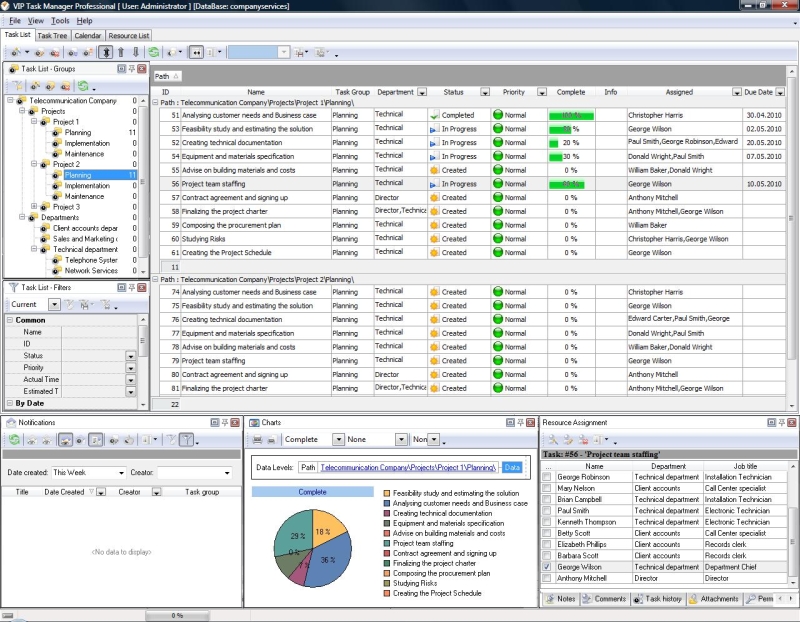
  • Staff schedule spreadsheet – it is indispensable staff schedule format when you need to describe your tasks with a big number of different attributes. The main strength of staff schedule spreadsheet is that you can add any number of columns (representing task attributes) and lines (tasks) to create comprehensive to-do list for your employees. VIP Task Manager features special staff schedule spreadsheet (Task List) that can be adjusted to fit your specific needs (you can create staff schedule template arranged in terms of individuals, departments, time etc). Unlike any staff schedule Excel template, this in-built spreadsheet has better usability, and also unlike Excel staff schedule template that uses outdated file sharing method, this spreadsheet is shared through database management technology (Firebird) minimizing risk of errors.  

VIP Task Manager is staff schedule software which can ensure instant real-time collaboration between managers and other members of the team. This is not free staff schedule software, but effective commercial groupware with staff schedule template free trial version (30 days). In order to work, you do not need to download any paid or free staff schedule templates, but you can easily create interface layout yourself, avoiding any unnecessary things, just matching your specific requirements. In order to evaluate functions of this software you can start working with your own newly created database or to use staff schedule sample database.


VIP Task Manager
Task management software
for teams & small offices
Play Demo / Download

CentriQS
Business management software
for small & midsize enterprises

Play Demo / Download


home contact site map my account


Copyright © 2004 - 2012 VIP Quality Software, Ltd. All Rights Reserved.