


 home
home contact
 site map
 my account


|
| |||
 |
|
 |
VIP Task Manager |


|
| |||
|
|
|
VIP Task Manager |
Task scheduler software is a tool for organizing your appointments and time-related records in a manner making you aware of your commitments and tasks without applying extra-efforts. In other words such a desktop tool is running on your computer all the time, informing you of your pending tasks, reminding you of tasks which are late, and showing you if any deadlines are close enough to require your attention. There are different kinds o , for example they may differ according to operational systems they need to run. It is natural that if you have a PC driven by Windows you should consider any type of Windows products, the same way as if you use Linux system – you cannot install there nothing than a Linux task scheduler – this may be a tool which was designed only for Linux platform, or let’s say only for Mac platform if you use Apple computer, or it can be any kind of cross-platform software which can be installed on any system delivering the same functionality for Windows, Mac and Linux. | ||
If you travel a lot, or your workflow needs from you to be out of office the most of your time, then you need that software supporting your mobile way of living – it could be just a Web task scheduler which enables you to enter your data using your laptop (or any available desktop) from any point of the world where you can find Internet connection, or it could be software installable on handheld devises, so it could be driven on mobile OS, for example Android , or Windows Mobile, Apple’s iOS or anything else like that. |
  Play Demo Play Demo
|
|
 |
If you possess skills of a professional software developer then you may like any kind of open source packages which can provide you with everything necessary to design and develop your own solution matching your personal needs and vision. If you are already a user of Microsoft task schedulers such as Outlook or specially customized Excel , then probably you will like the program represented in the following paragraph which has all the functionality to overcome mentioned products.
|
|
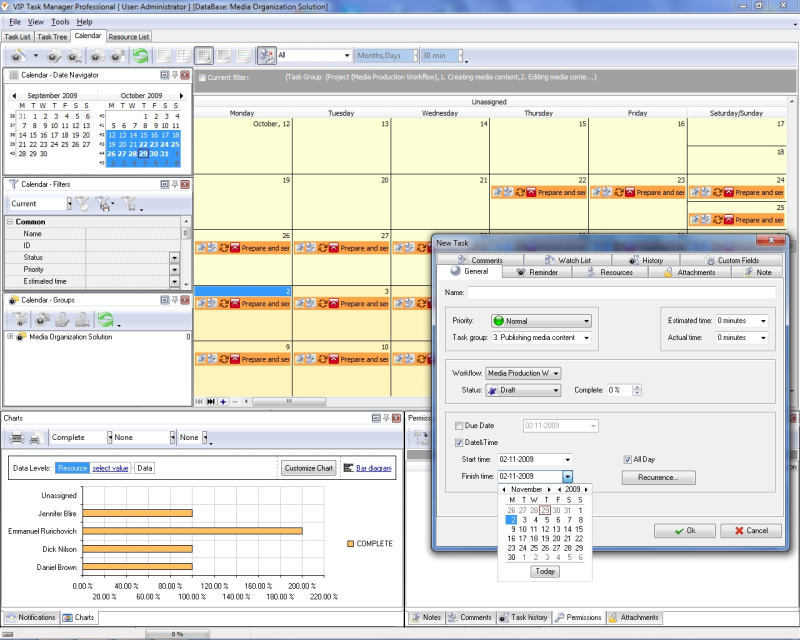
VIP Task Manager is multi-user task scheduling software that can give you quite rich capabilities in planning, tracking and sharing tasks within a team of collaborating specialists. With a help of this easy-to-use program you can facilitate coordinating project tasks and calendars in a project team, along with sharing reminders and keeping all the teammates mobilized around the common commitments which should be met in terms of accepted project timeline. |
||
 Play Demo
|
| |||
|
|
|
VIP Task Manager |

 home
home contact
 site map
 my account