


 home
home contact
 site map
 my account


|
| |||
 |
|
 |
VIP Task Manager |


|
| |||
|
|
|
VIP Task Manager |
Formerly, people used pen and paper as task solutions to manage and track tasks, simply jot down responsibilities, define prioritized activities, add notes, and check off jobs when completed. Today most people tend to use computerized versions of paper task diary and worksheets to get a more suitable and convenient framework that helps resolve the most complicated issues and manage daily tasks. Task programs allow getting organized by creating to-do lists, projects and schedules in an electronic format. Users can manage personal tasks and get access to shared tasks and documents stored on servers. Here are several tools that shareware delivers to users:
| ||
These tools can be included in one or another server solution, in full or in part. There are online and desktop solutions. Online solutions usually feature specific functionality that allows users to access task website login pages and connect to online to-do lists and agendas. However, web-based services are usually insufficient because websiteshave inconvenient interface options and do not support contextual menu. In addition, live high-speed Internet connection is required to access online widgets and gadgets. |
  Play Demo Play Demo
|
|
 |
Desktop-based services and solutions do not depend on high-speed Internet connection, and they allow connecting to task servers over local area network. Desktop-based task programs for Mac and Windows are widely used today to organize office tasks, business activities and projects.
|
|
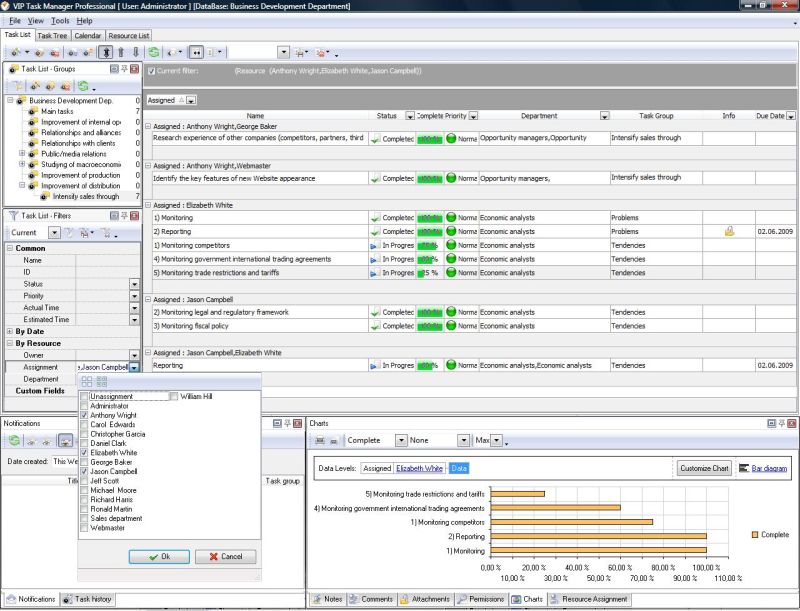
VIP Task Manager features a powerful task dashboard that consists of Task List view, Task Tree view, Calendar view and Resource List view for the best management. This task wizard software uses client-server technologies that allow users to collaborate with each other, share tasks, manage documents and review profiles. VIP Task Manager has a programmability feature that allows customizing statuses of tasks and creating specific services and workflows. The programming feature is perfect for defining process steps and project phases. VIP Task Manager is available as a task program free for download (shareware). |
||
 Play Demo
|
| |||
|
|
|
VIP Task Manager |

 home
home contact
 site map
 my account