


 home
home contact
 site map
 my account


|
| |||
 |
|
 |
VIP Task Manager |


|
| |||
|
|
|
VIP Task Manager |
Usually business processes and tasks are repetitive – this means that such processes are typical enough to be standardized, and they, including their typical steps and order, may be performed periodically or casually. In order to facilitate dealing with recurring workflows, we can use special templates. There are different formats, including electronic and paper-based, but all of them are created to automate setting and managing standardized tasks. Actually template is a kind of framework that helps in statement and systematizing working tasks, saving a lot of time and energy on job performance and supervising. There are several kinds of work patterns – for example, descriptive type (fill-in-the-blank), to-do list, and time-oriented (calendar ). | ||
|
All kinds of agendas are widely used in project and daily work management – fill-in-the-blanks can be used for specifying, describing and assigning particular tasks, defining their work scopes and important characteristics, to-do lists are used to outline sequence of tasks, while calendar task templates show timeline of activities – what and when should be started and completed. Also, there are different kinds of calendar task templates, depending on considered time period and necessity of "zooming" into details – for example daily , weekly and monthly patterns. Besides this, the type can be also composed in time-specific manner. |
||
 |
There are different programs designed to manage task templates. For example, project task template can be composed with a help of well-known Microsoft products like – MS Word , Excel , or Outlook template. All these programs have certain disadvantages, preventing them to be really effective. For example, Excel file is a powerful multi-functional spreadsheet that can work well for one person, but when it comes to sharing agendas among several users concurrently – it is not the best solution, because of outdated file sharing technology causing certain errors, up to losing of data, also high price per license and complex interface. Word based solution is not effective at all, because there is no any job management functions, moreover one file cannot be viewed by several persons concurennlty. Task template Outlook is the most effective solution, because of special and powerful functionality of this product, but it yet needs additional paid Microsoft software to establish collaboration. |
|
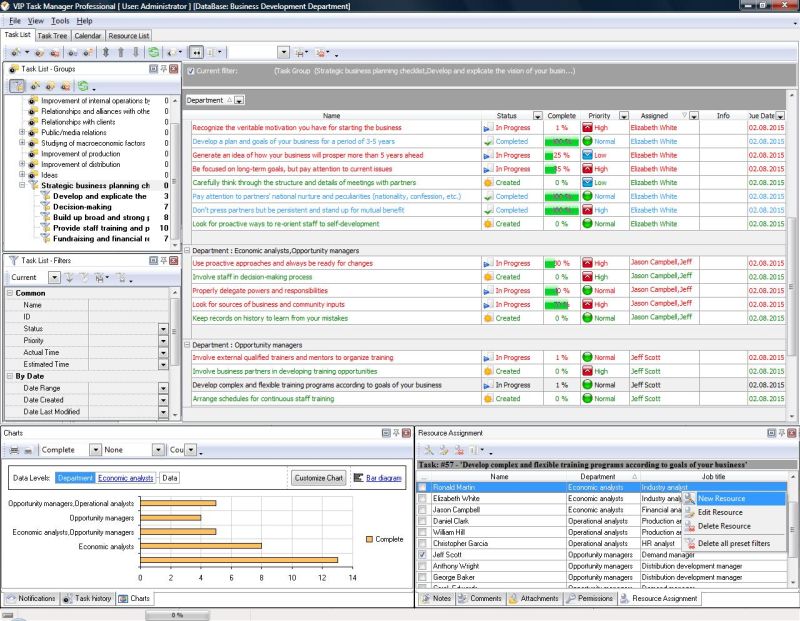
Let's consider special software that combines simplicity in use and installation, along with all capabilities necessary for effective working with tasks. VIP Task Manager is well-featured software that enables multiple team members to share task templates of different types through real-time task management functionality of Task List, Task Tree, and Calendar (withregimes of daily , weekly and monthly agendas. This software enables all team members to use common database and switch between different viewing modes in order toplan, assign, schedule, review and report tasks. Read also a new article about process management - project management client-server software for Windows |
||

 Play Demo
 Play Demo
|
| |||
|
|
|
VIP Task Manager |

 home
home contact
 site map
 my account