


 home
home contact
 site map
 my account


|
| |||
 |
|
 |
VIP Task Manager |


|
| |||
|
|
|
VIP Task Manager |
When you plan your work, using task templates will greatly speed up and simplify this process. software allows you to design your own templates and samples as well as use prebuilt patterns that can be downloaded from online resources. software makes it easier for you to plan and do your tasks because you can save time and avoid wasting. For example, you need to plan regular meetings with your colleagues. Instead of planning multiple tasks for preparing these meetings you can create (or download from Internet) a single template that includes all necessary tasks for setting up a typical meeting agenda. You can use timelines to schedule meeting time and also specify notes during each meeting. tables, schedules and sample to-do lists are widely used in planning and managing projects. Popular free software solutions allow creating a collection of prebuilt and predefined documents to plan project activities, define task durations, estimate costs, view performance and develop status reports. Professional software simplifies team management allowing group leaders and managers to use sample to-do lists, schedules and prebuilt group calendars for establishing teamwork. timelines, schedules, tables and spreadsheets allow you to add consistency to your work and implement successful projects. Obviously your work and projects will be better planned and organized if you use software free download solutions. For example, you can try to use VIP Task Manager that helps simplify daily workflows and tasks. | ||
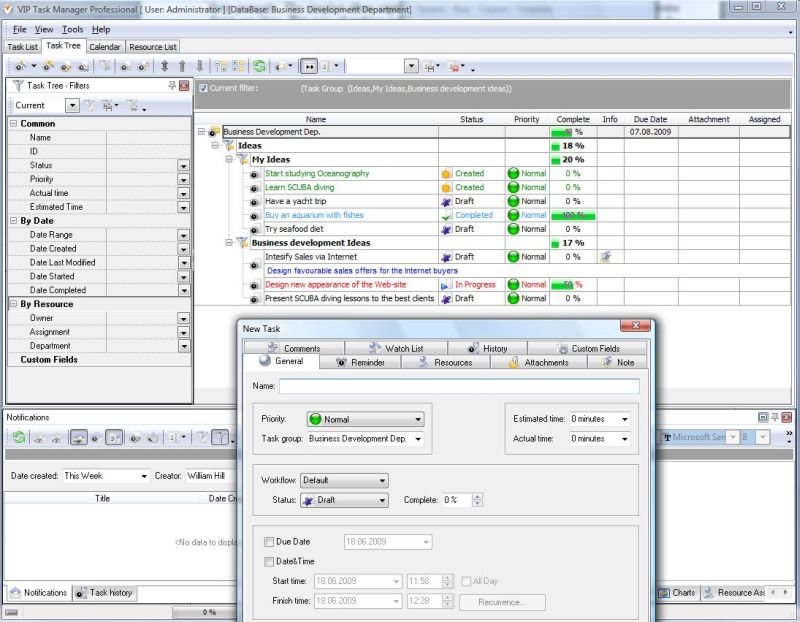
VIP Task Manager features Task Tree view that allows building task templates and sample to-do lists for better task management and work planning. In Task Tree view you can create a template of tasks, share it with other users, specify notes, design hierarchical project trees, and duplicate tasks. Users can view and edit your tables, task lists, hierarchies and trees.
|
  Play Demo Play Demo
|
|
 |
VIP Task Manager also features Calendar view that is best for scheduling activities, events and tasks. In Calendar view you can design schedules, make event lists, share calendars and filter scheduled tasks. You can display several calendars and work schedules on one screen.
|
|
You can download a 30-day free demo version of VIP Task Manager. Unlike freeware, VIP Task Manager offers free shareware solutions. It allows you to test functionality, options and features prior to purchase. |
||
 Play Demo
|
| |||
|
|
|
VIP Task Manager |

 home
home contact
 site map
 my account