


 home
home contact
 site map
 my account


|
| |||
 |
|
 |
VIP Task Manager |


|
| |||
|
|
|
VIP Task Manager |
|
Not all software solutions for project or business management can show extended planning and scheduling functionality that would help create event timeline for managing working hours as well as work schedule for managing actions and tasks. However, when driving a large enough business or running complex projects, users may feel the necessity to manage their tasks and time by using business agenda and timetable. They will start looking for more advanced business/project solutions that would help meet all their needs. Advanced job management software solutions aren't just about scheduling and managing works. They are also about how essential information can be presented and processed by employees in an efficient manner. Such solutions have time line view functionality. Timeline view offers a set of tools and interface options introduced in business/project management software to show, share and print information in the most convenient way. In business management, the functionality will let create business timelines and event timelines to schedule, manage and review the activity. In project management, timeline view functionality is an efficient way to design and manage timetable, task timeline and process timeline allowing the project team to get a complete understanding of the whole project workflow. | ||
|
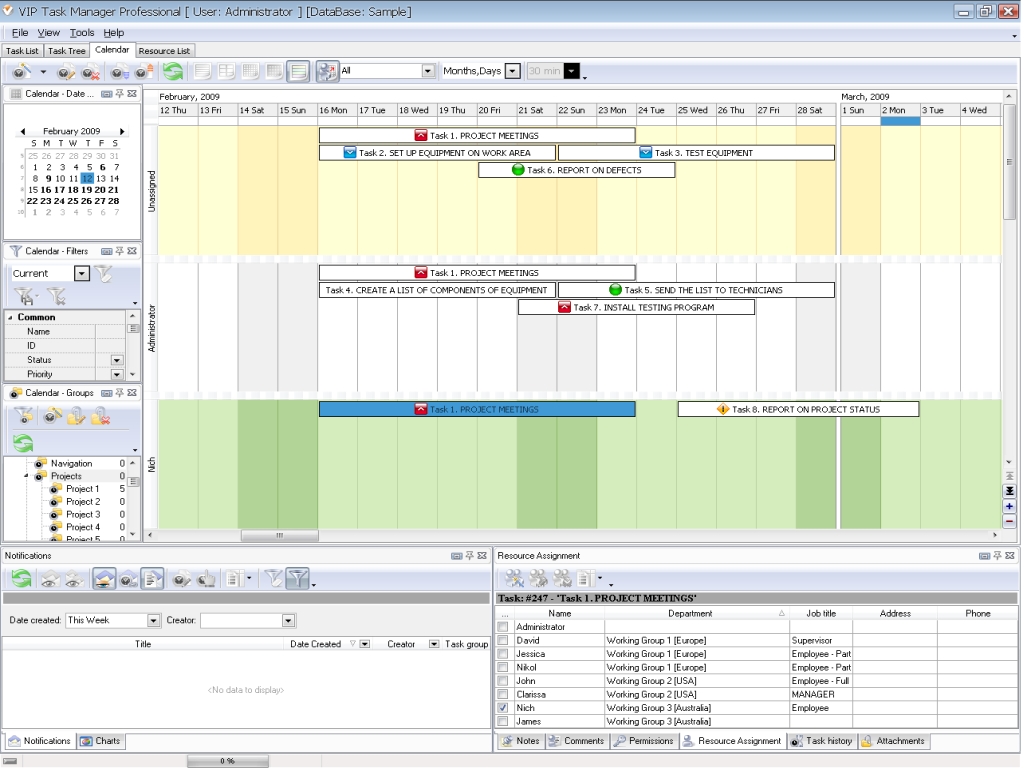
Task Manager Professional is a client-server program for task managing, scheduling, tracking and reporting. It's very useful for both business and project management. VIP Task Manager offers advanced view functionality to create, manage and track items of project schedule or business timetable. Since the program supports group collaboration and real-time data exchanging, you get the benefits in the following: |
||
 |
|
|
VIP Task Manager allows showing daily, weekly and monthly tasks on the timeline view. You can enjoy using the program for absolutely free within thirty days of trial period. Read also a new article about process management - project management client-server software for Windows |
||

 Play Demo
 Play Demo
|
| |||
|
|
|
VIP Task Manager |

 home
home contact
 site map
 my account