


 home
home contact
 site map
 my account


|
| |||
 |
|
 |
VIP Task Manager |


|
| |||
|
|
|
VIP Task Manager |
|
Tracking sheet is a managerial informative tool that is used for periodical recording and analyzing the progress of your team members. Information represents executed work in terms of different characteristics. The purpose of tracking sheet is to identify and measure success in project performance or to detect problems and delays. Depending on project timelines and project policy, progress can be researched with different periodicity, for example there can be a daily , weekly , worksheet and so on. There are projects that use different kinds simultaneously. We can consider as an examplejust a simple checklist where you check off completed tasks. Any kind of work sheet should contain data suitably represented according to terms and content of the project. So no matter, they should deliver clear, comprehensive and standardized data to project manager who processes job lists and agendas. In order to standardize data and avoid mistakes a project can be supported by a template (daily, weekly or monthly template that project participants use to input data about their achievements). | ||
|
Let's consider one example. The basic type is a daily tracking sheet that is peculiar to short-term projects or projects with necessity of sensible monitoring where every day is important. It contains data collected during the day and should be updated on a day-to-day basis. It represents generalized or/and detailed picture of working progress that was achieved by team members during the day. |
||
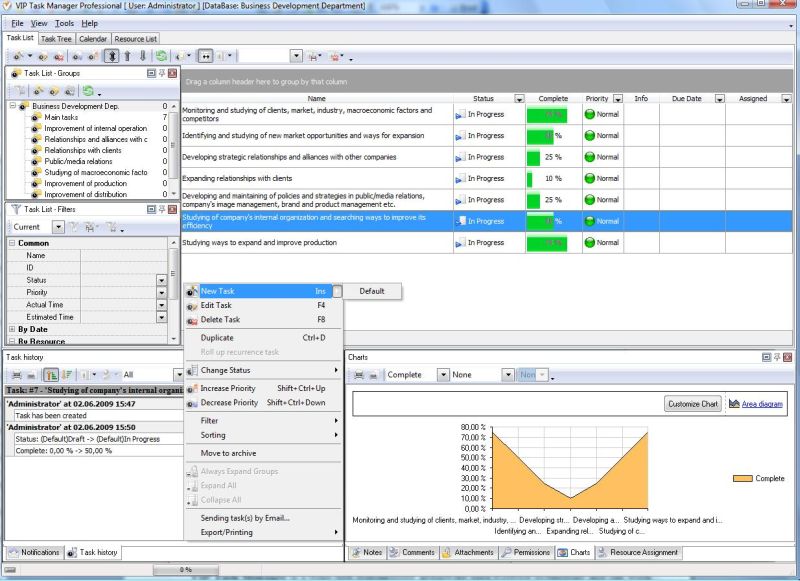 |
This data may include descriptions of completed tasks, how much time was spent etc. Progress tracking sheets, collected during the week, can be used as the material for a summarized weekly action plan - this is the hierarchical tracking style where a weekly agenda is a source for a monthly work sheet and so on. |
|
VIP Task Manager is real-time project management software that helps to form and update tracking sheet that shows progress on entire project or its different stages. This effective program will make planning and controlling of your projects easy and joyful. With a help of this convenient and easy-to-use tracking sheet software you can overview and analyze achievements of your team members in terms of tasks, time, costs, quantitative outputs and productivity. You can study tasks in views. In order to facilitate labor of managers and performers this software allows creating templates and provides printable task lists. Read also a new article about process management - project management client-server software for Windows |
||

 Play Demo
 Play Demo
|
| |||
|
|
|
VIP Task Manager |

 home
home contact
 site map
 my account