


 home
home contact
 site map
 my account


|
| |||
 |
|
 |
VIP Task Manager |


|
| |||
|
|
|
VIP Task Manager |
|
As a manager or a team leader, you might want everyone in your team to be able to start following your orders and instructions immediately after a new message is arrived. User notification tools of task management software allow you to send different notification types to let employees get "approvals" before they can start doing their work. Here is how notifications of personnel action work: you use tasks and schedules to plan a project or outline daily to-do lists for your employees. When you finish planning your project or daily to-do lists, that tool helps you get employees informed of new tasks and schedules, so you and your employees can join efforts to achieve common goals. If you need to hold a meeting or arrange an appointment, notifications of appointment or notifications of meeting can be sent to your employees to let them know date, time, place, and issues to be discussed during the next meeting or appointment. Those services and tools of task management software support the following notification examples: | ||
|
||
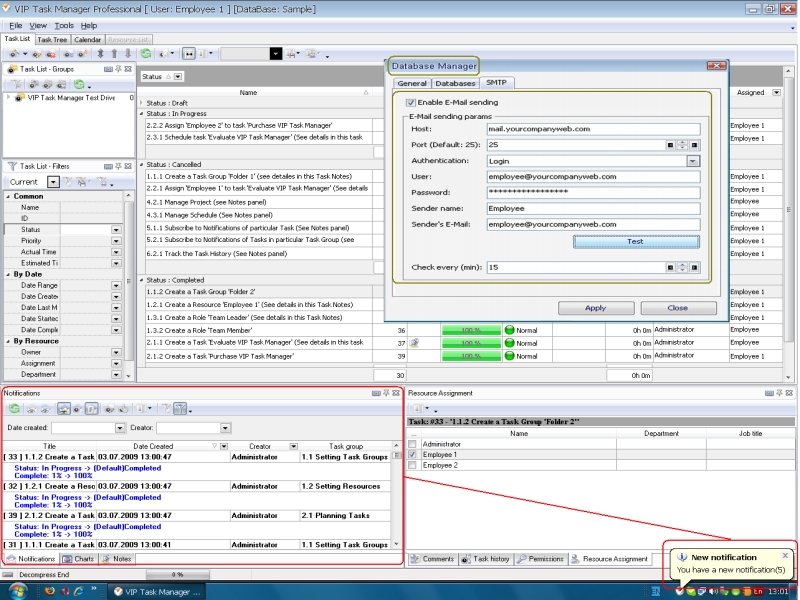 |
VIP Task Managerhas a convenient notification bar (Notifications Panel) that offers great functionality to receive/send popup and email messages. The software is based on a client/server technology offering powerful services to control and track teamwork. When some tasks are changed, VIP Task Manager immediately sends notifications of change to all concerned users. |
|
VIP Task Manageris available for free within 30 days. You can download and evaluate the software to understand how it can help you manage teamwork, send/receive instant user notifications and collaborate with team members in real time. Read also a new article about process management - project management client-server software for Windows |
||

 Play Demo
 Play Demo
|
| |||
|
|
|
VIP Task Manager |

 home
home contact
 site map
 my account