


 home
home contact
 site map
 my account


|
| |||
 |
|
 |
VIP Task Manager |


|
| |||
|
|
|
VIP Task Manager |
WBS maker (where WBS refers to “work break-down structure”) is a type of computer-based tool helping you to depict a structure of business processes and projects in a way representing them as tree-like hierarchies of interrelated elements, visualizing how the bigger components of the project are subdivided into smaller ones, and how necessary project resources (labor, time and budget) are allocated among these components. The process includes a method of making a project more measurable and controllable, for example in terms of general work components (stages, work packages etc.) and in terms of job distribution showing you how each work element is supported with necessary resources. WBS tracker is a tool which assists you in keeping this levelled structure under control to oversee the progress on each of task-tree sectors. The purpose is about learning progress scale in terms of different branches of the project tree and its different levels for having a general sight of the project along with possibility to delve into details. The implementation entails increasing of your productivity and effectiveness as a project manager, but it requires from you possessing some skills like understanding when it is necessary to stop dividing work into smaller elements. | ||
The most of products combine functions of job tracker and maker, for example you can do it with a help of MS Excel and its template examples that can be downloaded from official web-site or from any web-site supporting Excel community. Managing tasks using Excel is probably a good variant when you work alone, but if you want to collaborate at projects together with your teammates, then it’s not acceptable as far as you will need to buy Excel license for all teammates and share one spreadsheet file through outdated file-sharing technology (shared workbook) used in Excel, causing different file errors. Let’s consider more reliable and cheaper solution: |
  Play Demo Play Demo
|
|
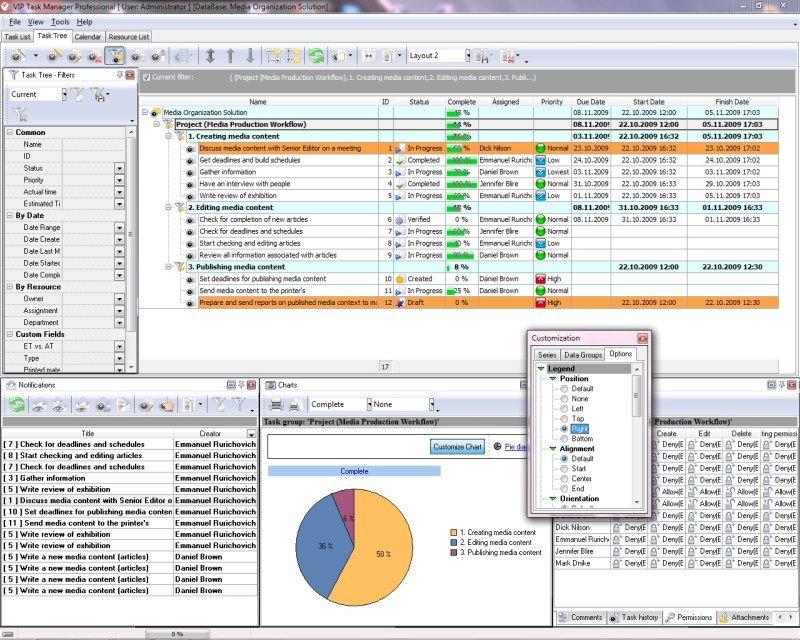 |
VIP Task Manager is multi-user task management software. With help of this software package you can plan and control your projects divided into task groups and smaller activities of lower levels. With a help of special capabilities you can control project activity when switching to more details and also switching to less details to supervise higher levels of task groups to know the summarized progress by all the tasks included into these groups or in each task group particularly. |
|
For this purpose it provides Task Tree mode where you can see all the tasks within the project grouped by project stages, processes, phases etc. This software allows you to create templates matching your needs – you are free to create different layouts of the interface to find the optimal view for each your need. You can even create special template sets for each of projects you drive and for each person collaborating with you, so then they can be shared. |
||
 Play Demo
|
| |||
|
|
|
VIP Task Manager |

 home
home contact
 site map
 my account