Task Management Software


New Articles New Articles RSS feed subscribe
 
Interactive Task Priority Template
We all have to cope with dozens of our daily tasks, and it is easy to lose effectiveness while approaching all this abundance of commitments Interactive Task Priority Template


New Checklists News RSS feed subscribe
 
Interactive Process Action Plan

This Interactive Process Action Plan will be helpful both to employees and employers to know their duties and rights in terms of Interactive Process

Interactive Process Action Plan


Home » Solutions » Articles » Work scheduling software - how to choose appropriate solution and ensure shareable working schedules
Work scheduling software - how to choose appropriate solution and ensure shareable working schedules  

Work scheduling software - how to choose appropriate solution and ensure shareable working schedules


Work scheduling software is what project and business managers seek for better administration and higher management efficiency. Work schedule software is a solution that maintains agenda of project or business team. Work scheduling system can be highly useful both for managers and for performers, because it can make project and work planning clear and transparent. The main purpose of work scheduling software is to put in order working tasks, outline objectives, set priorities and deadlines. Usually, any well-featured work scheduling tool is a commercial product, but normally developers provide work scheduling software free trials or free editions with reduced functionality. You can use such work scheduling software free trial until the expiration date. It seems to be a hard task to select an appropriate work scheduling program, because this market is congested with various web-based and desktop solutions. Let's consider how to choose the right work schedule software.

In general work scheduling software can be divided into two categories: single-user and multi-user. Work schedule software for multiple users is oriented on workgroup management and single-user work scheduling tool is intended for individual professional agenda management. Most often multi-user work scheduling system is used as a sharable project schedule that informs performers about tasks they have to do, timelines and other required parameters.  Multi-user work scheduling program can be interactive or just informative.

Work scheduling software

Let's consider these two types of work scheduling software closer. Informative work schedule software features sharable worksheets that can be seen by employees, but these schedules are unappropriated for modifying from the side of employees. The concept of action of such work scheduler is the same with paper schedule posted on the wall - work manager uses work scheduling system to create worksheets or common work schedule that can be opened by employees from their personal computers in order to see work plans, but average users are not enabled to modify them, only work manager can do that. Interactive work scheduler is much more effective because such work scheduling software allows users to edit and update their tasks lists and deliver this information to common database, so work manager can track evolution of project in terms of task completion and time.


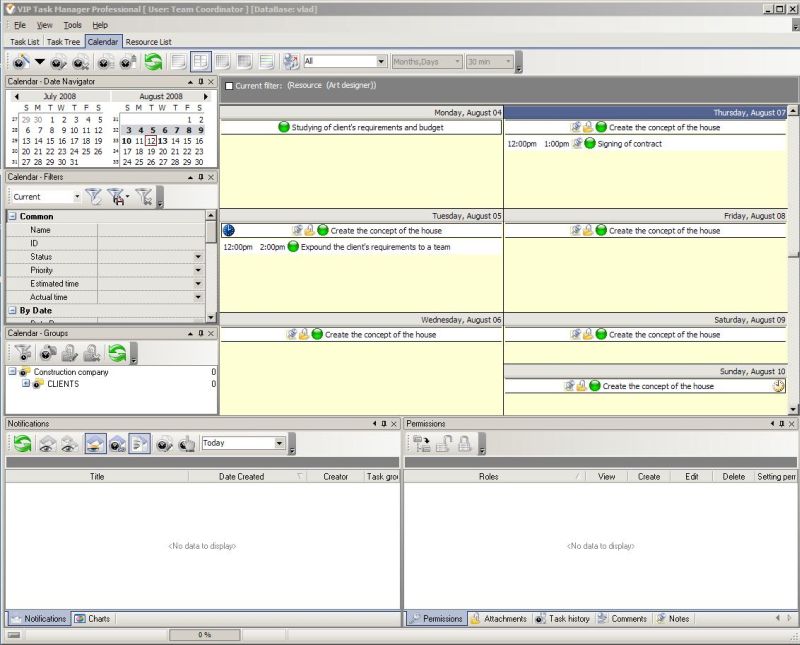
VIP Task Manager is work scheduling software that allows multiple users to work in one database simultaneously. With a help of this work scheduling tool you can manage tasks lists and calendars for your working team.VIP Task Manager is group work schedule software that allows creating interactive shareable task schedules that can be accessed by multiple users. You can evaluate this work scheduling software free trial version for 30 days.

Read also a new article about process management - project management client-server software for Windows


VIP Task Manager
Task management software
for employees collaboration
Play Demo / Try It FREE

Project Checklists
140 printable checklists
for project management

Learn More / Buy Now


home contact site map my account


Copyright © 2004 - 2012 VIP Quality Software, Ltd. All Rights Reserved.