Task Management Software


New Articles New Articles RSS feed subscribe
 
Setting Dependencies between Sub-projects
Sub-projects are smaller, interrelated projects that compose larger projects. If sub-projects belong to one and the same project or programme, they are dependent upon each other in some way. Setting Dependencies between Sub-projects


New Checklists News RSS feed subscribe
 
Company Expenses Action Plan

Read this Company Expenses Action Plan to find out what kinds of expenses your small company is likely to generate.

Company Expenses Action Plan


Home » Solutions » Articles » Work time management software - getting more results in shorter time
Work time management software - getting more results in shorter time  

Work time management software - getting more results in shorter time


Time is money!
Time is irreplaceable resource. Without work time management software any company will find it hard to manage work time and track employee performance. An old cliche says that time is money. But do we understand and apply it properly in business practice? For instance, should you make a phone call to a partner for talking rather than just send an e-mail? Sure, a phone call might be more effective as you could hear your partner and discuss all questions on-the-fly. But as a rule phone talks may take 10, 15 or even 30 minutes while an e-mail message may resolve all questions in 5 minutes. So the point is to organize and manage work time properly. And work time planning program helps get all jobs and tasks organized. Work time management software allows to count and manage work time of employees by using electronic timesheets and real-time work tracking tools.

It's not a routine. It's work time scheduling
When a manger understands that all tasks and jobs of his subordinates should be properly organized, he starts considering work time scheduling and work time planning as not a routine but a simple enough process. By using work time program, the manager can clearly plan out employee workload and easily track work time. The work time scheduling process includes creation of timesheets and worksheets. Work time management software allows to set timeframes, deadlines and duration of a task, so the manager creates planned characteristics to get them compared with actual ones.

Setting priorities
Besides the task scheduling, the work time planning process also includes prioritizing. Task prioritizing is used to show an employee in which order he should do his tasks as well as which tasks are urgent and require immediate attention. Work time program allows setting priorities at the stage of work time planning as well as during the task performance in real time. This capability of the software gives more flexibility to track work time and change priorities on-the-fly.

How much is work time worth?
The issue how to estimate and track work time is fully resolved by using work time tracking software. For example, the manager can use work time program to lay down a plan and set deadlines. Then at the end of workday or month he can put planned values against actual values so that to find out whether the plan is fulfilled or failed. Following the obtained result, the manager can estimate the work based on spent work hours. Work time tracking software helps estimate tasks and jobs according to the time spent by an employee.

Work time management software

Getting work time management software right now from this page
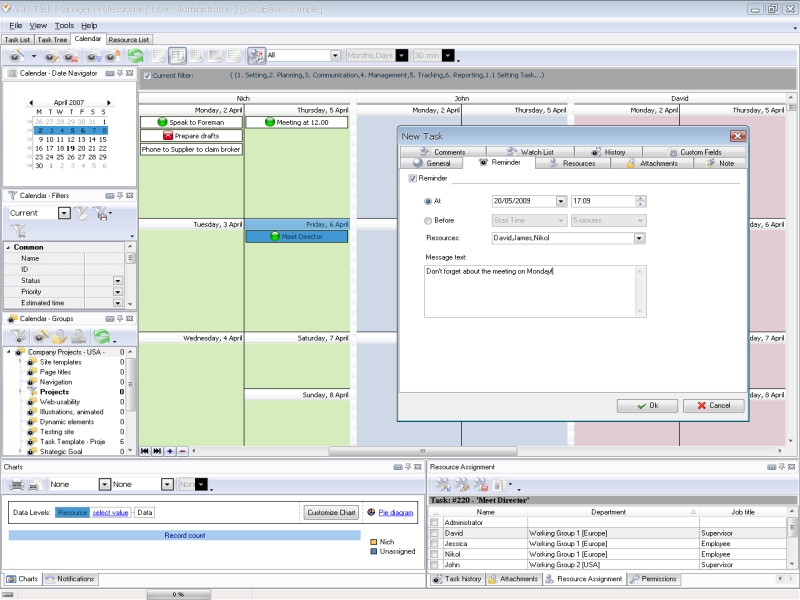
A good example of work time management software that you can find in the web is VIP Task Manager. On this page you can download a free trial version of this work time tracking software.VIP Task Manager is a great choice of many HR managers and team leaders who need to get work hours of their employees scheduled, planned, tracked and estimated. The feature list of the work time management software includes the following items:

  • Task Tree view to build a tree-like structure for projects and departments
  • Task List view to make task lists comfortable for planning, doing and tracking
  • Resource List view to add new employees and manage their profiles in the corporate database
  • Calendar view to create and print out timesheets and worksheets
  • Multiple task characteristics for work time management, including Due date, Start/Finish dates, Estimated/Actual time
  • Custom fields to create customized task columns
  • Notifications panel to track task statuses
  • Pop-up  and e-mail reminders to prevent overdue jobs and missed events

Read also a new article about process management - project management client-server software for Windows


VIP Task Manager
Task management software
for teams & small offices
Play Demo / Download

CentriQS
Business management software
for small & midsize enterprises

Play Demo / Download


home contact site map my account


Copyright © 2004 - 2012 VIP Quality Software, Ltd. All Rights Reserved.