


 home
home contact
 site map
 my account


There are a variety of user collaboration solutions Wikipedia suggests that you can find in Internet, so it can be an arduous task for you to select solutions that meet your needs in the best way. The idea of this collaboration tools review is to provide you with information about those special solutions, so you could make the right choice in favor of one or another solution. At the end of the review, examples are given below. What are collaboration tools? In a general sense, they are ways of cooperation and teamwork between people. They refer to something that helps us collaborate and communicate with each other. User collaboration packages can be paper notebooks and organizers, as well as standalone software solutions that allow creating paperless (electronic) diaries and sharing files between users over a network. A virtual work environment created and maintained by that software allows organizing telework and building virtual teams. Those tools for virtual teams are widely used today to manage outsourced projects. What are the features? Here are the most important features of collaborative software:
What are kinds and examples for business ? All collaboration tools can be divided into several kinds, including the following ones:
|
||
 |
| |
|
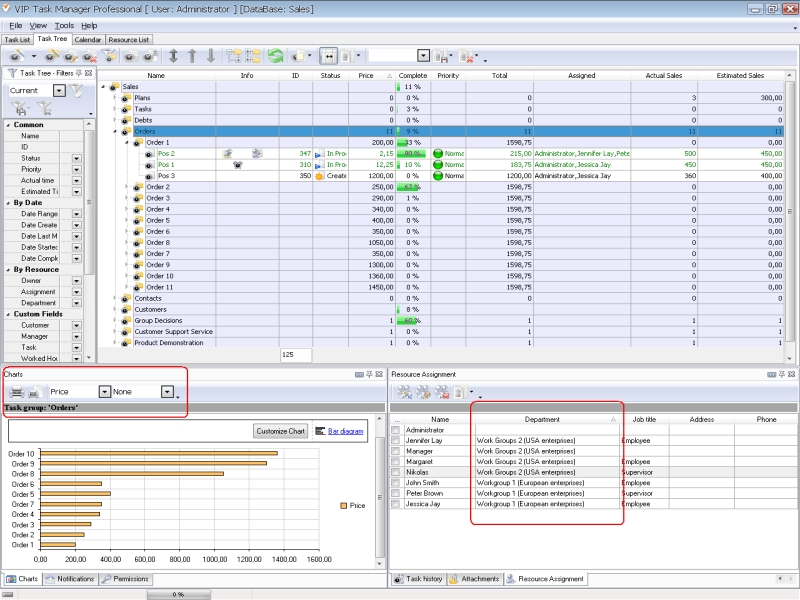
Being effective client-server software, VIP Task Manager gives you powerful functionality to manage tasks, jobs and activities related to organization and management of your business. At the end of this comparison you can find a link for downloading a trial copy of VIP Task Manager Pro. The trial copy can be used within 30 days for free. |
||

 Play Demo
|
| |||
 |
|
 |
VIP Task Manager |



 home
home contact
 site map
 my account