Filtering tasks of Telecommunication Company workflow
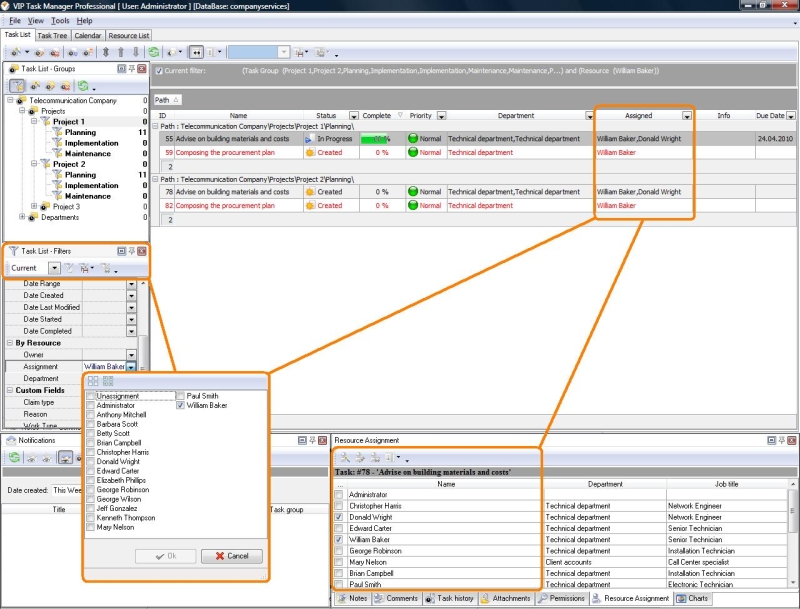
 Filters panel is one of the main tracking instruments in VIP Task Manager, and it can facilitate dealing with task worksheets inside of Telecommunication Company, because this feature allows users to filter the whole multitude of their tasks (through their Task Tree, Task List and Scheduler) in a way which enables displaying only tasks of required type. For example, technical team coordinator/supervisor can set Filters panel to evaluate how well deployment of telecommunication network within certain project is going on – which hardware and network components are already successfully installed, or which have status “In progress” with percents of completion etc. Basically, filtering features can be very helpful for driving projects in Telecommunication Company, because they help in: Filters panel is one of the main tracking instruments in VIP Task Manager, and it can facilitate dealing with task worksheets inside of Telecommunication Company, because this feature allows users to filter the whole multitude of their tasks (through their Task Tree, Task List and Scheduler) in a way which enables displaying only tasks of required type. For example, technical team coordinator/supervisor can set Filters panel to evaluate how well deployment of telecommunication network within certain project is going on – which hardware and network components are already successfully installed, or which have status “In progress” with percents of completion etc. Basically, filtering features can be very helpful for driving projects in Telecommunication Company, because they help in:
- control ling productivity and disclosing problems
- viewing tasks by value of attributes (by statuses, by priorities, by due dates etc.)
- viewing tasks according to categories, task groups, projects and project stages
Reporting and controlling status of task completeness
 Task management solution for Telecommunication Company allows giving different statuses to tasks and other business matters represented through tasks (clients’ requests, sales inquires and follow-ups, different documents etc). Sequence of statuses shows task workflow, identifying current state of its performance, so process of reporting and tracking tasks becomes very easy – you can verify, check-off or cancel tasks just by choosing the appropriate status . You can modify standard task workflow's to create unlimited number of custom statuses, to create any number of new workflow s, to set and modify dependence between statuses and grade of task completion. Finally, you can send automatic notifications to task supervisors, owners and assignment when status is changed. Task management solution for Telecommunication Company allows giving different statuses to tasks and other business matters represented through tasks (clients’ requests, sales inquires and follow-ups, different documents etc). Sequence of statuses shows task workflow, identifying current state of its performance, so process of reporting and tracking tasks becomes very easy – you can verify, check-off or cancel tasks just by choosing the appropriate status . You can modify standard task workflow's to create unlimited number of custom statuses, to create any number of new workflow s, to set and modify dependence between statuses and grade of task completion. Finally, you can send automatic notifications to task supervisors, owners and assignment when status is changed.
Identifying overdue tasks
With a help of specific functions of VIP Task Manager, you can instantly notice procrastinated (or close to procrastination) tasks with a help of automatic highlighting that enables you to know exactly how much time is left before due date of each task . For this purpose you can set and change color-coding of periods left before due date . |


 home
home contact
 site map
 my account







 home
home contact
 site map
 my account