


 home
home contact
 site map
 my account


Control equal accomplishment of all the projects
Most often company works at several projects simultaneously. If these projects are equally important for company policy, it's necessary to control their development and accomplishment. If the progress on one of the projects is left behind, it should be discovered in time. As it can appear, some projects are successfully realized, but others are neglected and forgotten. In order that the company won't face such situations, the leader should keep an eye on each project accomplishment and control the efforts that are given to each of them.
"Tracking project accomplishment" To Do List
- From time to time, track the completion degree of each project
- As it's more convenient to perceive the information in the form of charts, make graphic reports on the completion degree of each project
- If you realize that some project is neglected, take steps to catch up with it
- Use software to make graphic reports on completion of different projects and compare them
Action plan
- Start your team management software
- Set filter by task groups that contain the tasks of required projects
- Group the tasks by task group
- Go to Charts panel and select "Complete" field from drop-down list on Charts toolbar
- Compare completion degree of selected projects
See also:
Present the information in the form of diagram for better perception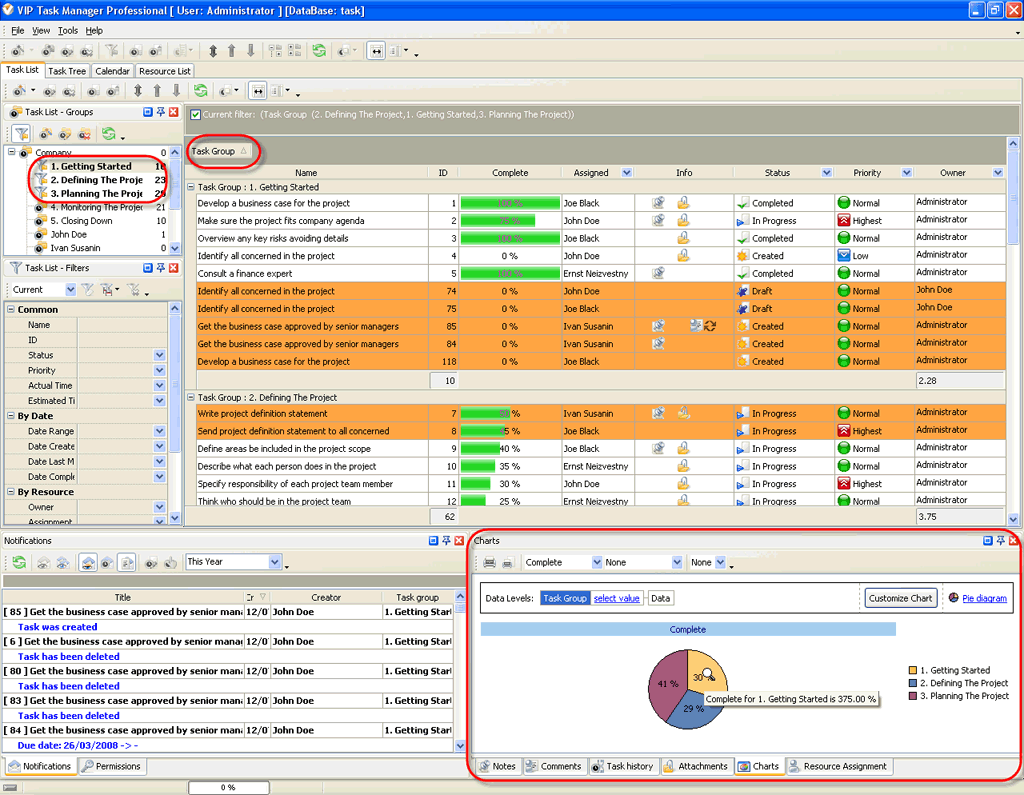

 |
CentriQS Reporting Tasks Solution CentriQS offers several tools for task reporting. Users can work with Pivot grid, generate charts and use Time Logs view which lets filter, group and sort time logs for creating time tracking reports. These reports can be used for various purposes such as performance measuring, payroll calculating, client billing, etc.
|

 home
home contact
 site map
 my account