


 home
home contact
 site map
 my account


Any enterprise that uses an enterprise level software solution can focus on the alignment of real enterprise's capabilities and business requirements. Enterprise level software enables to implement a systematic approach to planning, creating, doing and supporting critical tasks and processes. Advanced versions of enterprise level software allow managers to proactively control, monitor and remediate the enterprise's functioning. Software embraces the whole enterprise and detects issues on each business level, so its capabilities of primary cause analysis enable the issues to be identified in advance and corrected for the long term. The complex approach on enterprise management allows to avert appearance of imbalance and improper allocation of resources.
With help of VIP Task Manager, which is a good example of enterprise level software, you can get your enterprise well-managed and out of uncontrolled environment. VIP Task Manager is a network, server-based application that allows collaborating with each business unit, department or employee online and managing the enterprise at the highest level. The software creates common corporate database with a possibility to access information through personal login name and password. VIP Task Manager allows to implement rules of line management and create a group of supervisors who will be assigned to a set of definite responsibilities and subordinated to a manager.
Action plan:
- Run VIP Task Manager
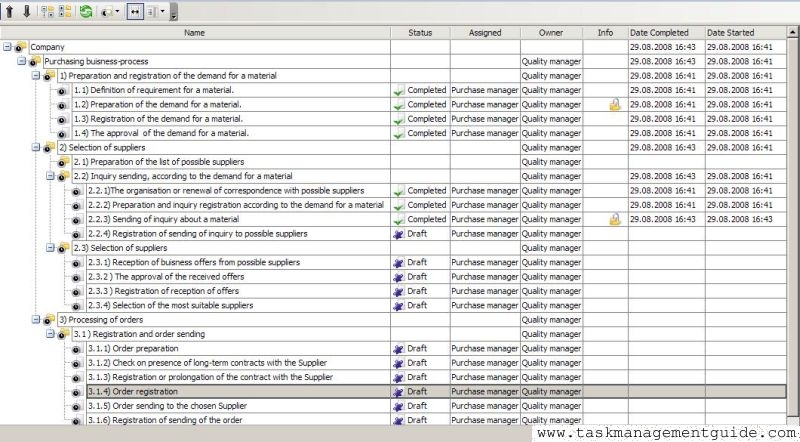
- In Task Tree view you can create a hierarchical view structure of your company. The structure will be divided into categories and subcategories
- In Resource List view you can add users who will access the corporate database by using log-in name and password
- Use Roles panel and Permissions panel to set user's privileges
- Use Watch List tab to assign a supervisor to a task
Set the list of responsibilities for each position of your staff

|
| |||
 |
|
 |
VIP Task Manager |



 home
home contact
 site map
 my account