


 home
home contact
 site map
 my account


In general, project manager is a person responsible for success of the project and control over each task of the project. The responsibilities of project manager embrace all phases of the project from initiating tasks to the project closure. Project manager should be oriented to team control and coordination throughout the project lifecycle to achieve project objectives and to meet requirement of stakeholders.
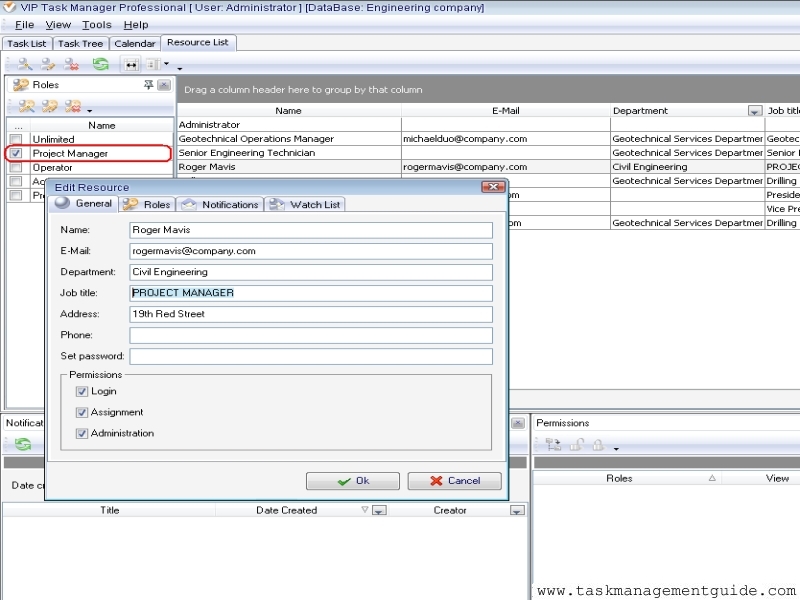
Properly selected project management software should give flexibility to set project manager's role. VIP Task Manager allows to define responsibilities and role of project manager. You can add the role, and define responsibilities by setting overall permissions or make particular restrictions to a task or a task group. The system can set limitation to the project manager's role in viewing, creating, editing or deleting tasks.
Action plan:
- Launch VIP Task Manager Professional edition and log in the database by administrator
- Go to Resource List view
- In Roles Panel create a new role "Project Manager"
- Create a new resource for Project Manager
- Select just created resource and check role "Project Manager" in Roles Panel.
- Go to Task Tree view
- Select the route task group of the project
- Go to Permissions Panel
- Select Project Manager's role and set "Allow" option to all column (View, Create, Edit, and Delete)
Note that you can use default role "Unlimited" which gives the project manager full responsibility for the project and the unlimited permission to all tasks and task groups within given database.

|
| |||
 |
|
 |
VIP Task Manager |



 home
home contact
 site map
 my account