Drafting legal documents
As part of Law department efforts to help the company produce clear regulatory documents, Legal Advisors with assistance of Paralegals create document drafts and standard forms for contracts. Before Legal Advisors start the document drafting, Department Manager should outline the main principles and specific legal requirements for document drafting.
|
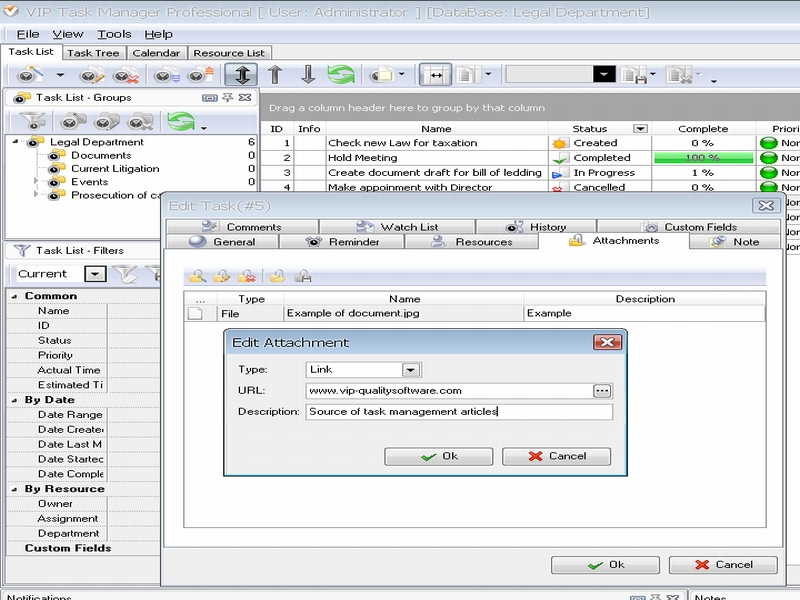
For example, these principles may embrace only maritime law as the company works in the field of maritime trade, so Manager should make emphasis on legal part of maritime commerce. He can use Attachment Panel in VIP Task Manager to enclose specific documents and written requirements to the tasks of Legal Advisors. While performing their tasks, the legal staff members can use attached materials for drafting documents and typical forms of agreements ad contracts.
|
 |
|
Keeping track of document drafting
Without proper activity tracking, it is hard to get a clarity that results from the use of good drafting principles and to find out whether specific legal requirements were met. Manager of Legal department needs to keep track of the tasks concerned document drafting in order to track current task statuses and take measures in case of procrastinations or necessity to change legal requirements for the drafting. Department Head can use VIP Task Manager as an effective tool for task tracking and communicating with legal experts. Notifications Panel allows receiving messages about task changes and tracking current task statuses. If needed, Department Manager can use Comments Panel to comment tasks and leave recommendations for document darting. If it needs to modify requirements to document drafting, Manager can change files in Attachment Panel, and the task management system will automatically notify all concerned legal experts of changed files.
Getting work results through task report
The way to get work results for document drafting is to use task reports. Manager of Law department needs to get such reports to analyze work done and get an accurate account of employee performance. |
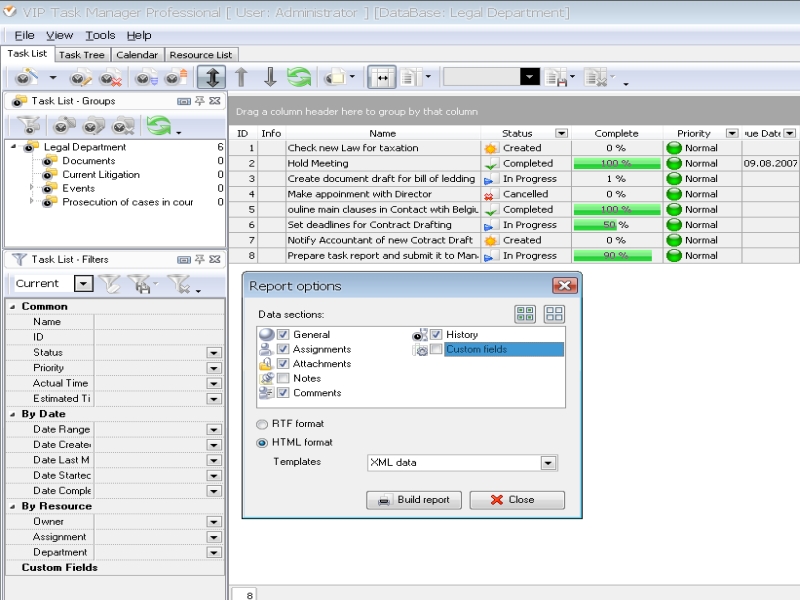
For instance, he needs to get a report that shows all task assignments and created document drafts during some period of time. By using Report Builder of VIP Task Manager, Legal Advisors can create a task report that shows all completed tasks, involved legal staff, scheduled timeframes, actual date started/finished, attached documents, history of task changes, and other necessary information. |
 |
| |
|


 home
home contact
 site map
 my account







 home
home contact
 site map
 my account