


 home
home contact
 site map
 my account


|
How to improve travel agency productivity in 3 minutes |

|
|
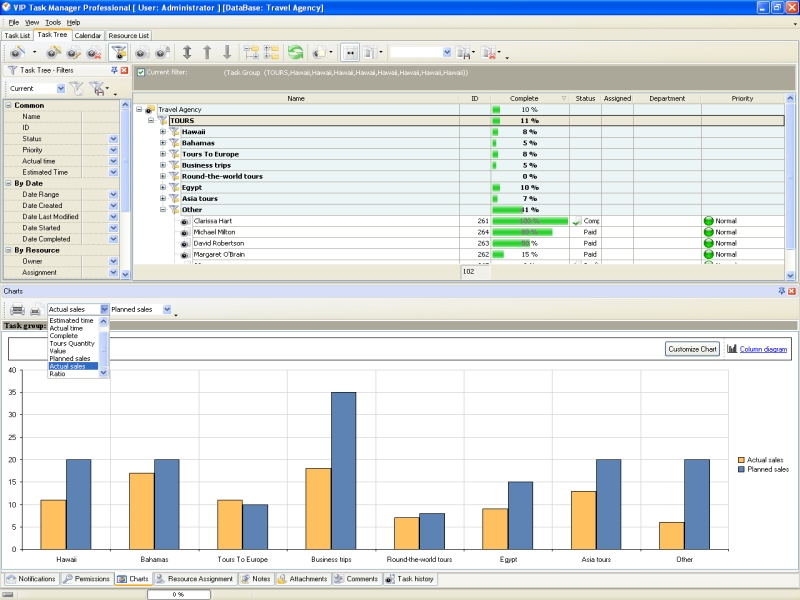
Key Performance Indicators (KPIs) are used in various organizations to measure overall and individual contribution to the goals of an organization. CentriQS allows to use KPIs in the travel agency solution. Usually the travel agency outlines a number of KPIs to estimate performance and evaluate current progress. Task performance of travel agents can be evaluated by comparing the quantity of tours actually sold with the quantity of tours planned to be sold. In the travel agency solution there can be accreted the following indicators: Planned Sales, Actual Sales and Ratio. |
||
 |
Planned Sales Planned Sales indicates the number of tours the travel agency plans to sell for some period of time (e.g. quarter, month, week). Supervisor can define sales plan in custom field tab of the task group "Tours". CentriQS allows to set permissions to the task group "Tours" so only Supervisor will be able to enter/change planned sales for tours.
|
|
Actual Sales This custom field shows the number of sold tours during defined period of time. It automatically calculates sold tours registered in the task group "Tours" by the travel agents. Ratio The custom field "Ratio" is calculated as a division between Actual Sales and Planned Sales. This performance indicator is helpful for Supervisors to track plan fulfilment. When building the custom field "Ratio", Supervisor should to insert an appropriate formula. Preview section All custom fields can be displayed as task columns in Task Tree view. However, Supervisor may need to create some specific indicators which are not concerned to all tasks or task groups. In this case, he can configure custom field options for a task group to get specific indicators displayed in the preview section of a certain task group. For example, the custom field "Ratio" is related only to the task group "Tours" and there is no need to concern it to all task groups and tasks in the travel agency database. Preview section in task groups can be hidden by using Preview Mode button in the toolbar. Displaying KPI in charts In the travel agency solution key performance indicators can be displayed in charts. The Charts Panel can be configured for showing the indicators "Actual Sales" and "Planned Sales" in single Bar diagram. Supervisor can select one of five available diagrams in Charts Panel. |
||
|
||
|
| |||
 |
|
 |
VIP Task Manager |



 home
home contact
 site map
 my account