


 home
home contact
 site map
 my account


|
The translation agency organizes a number of projects aimed to translate texts, documents, web sites, etc. Besides this, there is also a necessity to organize conversations, meetings, business talks and online sessions with foreign partners and visitors. The projects of the translation agency should be filled up with sufficient quantity of the specialists. The team of the translation projects may include such specialists as:
|
||
|
Adding a new resource Within the translation agency solution VIP Task Manager allows to add human resources in the projects by using Resource List View. For each of the resources there can be specified such details as Name, Email, Department, Job Title, Address, and Phone. Once a resource is added, a new user account is created and the user can access the database. In the field “Set Password” the user can change the access code to another. | ||
Supervisors If there is a necessity to assign a supervisor in large projects, Resource List View allows to predefine supervisors to resources in the tab “Watch List”. While editing a resource record, the manager can go to the tab and specify the list of supervised resources. It means that the supervisor will be able to watch the tasks of those resources and get notifications on any task changes. | 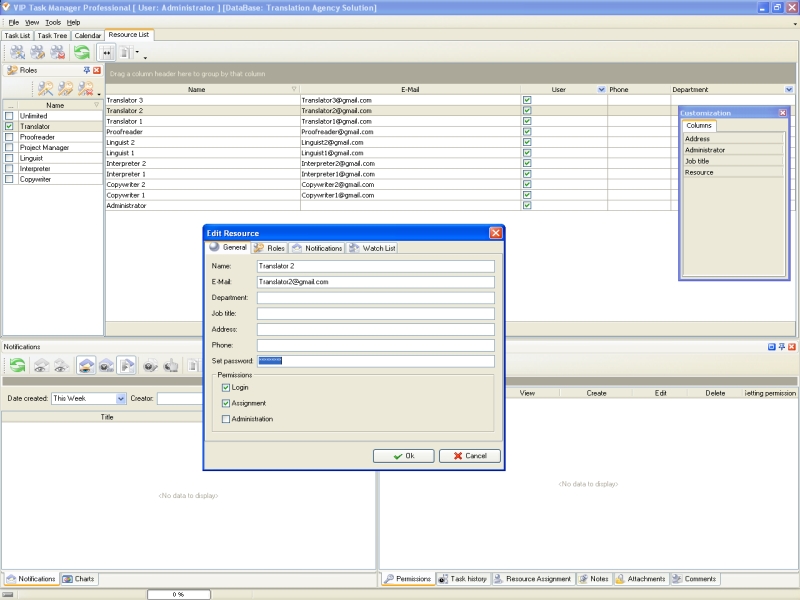 |
|
|
Roles The team of the translation projects should be divided into functional groups which called roles. This is a flexible way to associate an employee and groups with particular projects and easily delegate authorities. VIP Task Manager allows to create and assign project roles depending on the functions, authority and responsibilities of a resource. A new role can be created on Roles Panel in Resource List View. For example, for all copywriters there can be added the role “Copywriter”. | ||
Permissions Panel Activity of the translation agency becomes effective since there is proper task assignment within the agency workflow. However, there can be restrictions for some employees to the tasks so the management of the translation agency should take care of this issue. For example, the tasks assigned to translators shouldn’t be watched by interpreters. Actually, restrictions are defined by the agency policy so it depends on particular business environment the translation agency works at. >VIP Task Manager allows to deny or privilege access for the employees to the tasks in corporate database. This can be managed in Permissions panel. Depending on assigned role and special permission options an employee gets access to the tasks and task groups. The panel is blocked for unprivileged users so only administrator and managers of the translation agency can change permissions. | 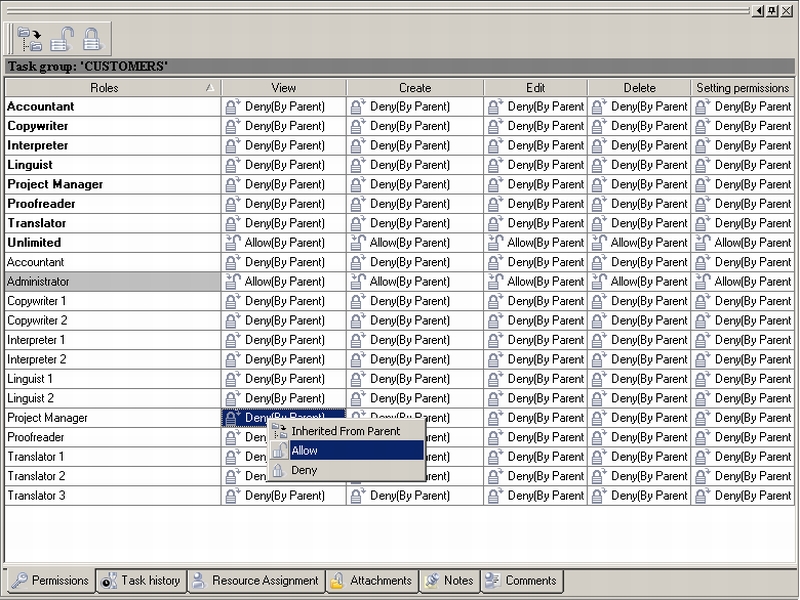 |
|
|
||
|
| |||
 |
|
 |
VIP Task Manager |



 home
home contact
 site map
 my account